
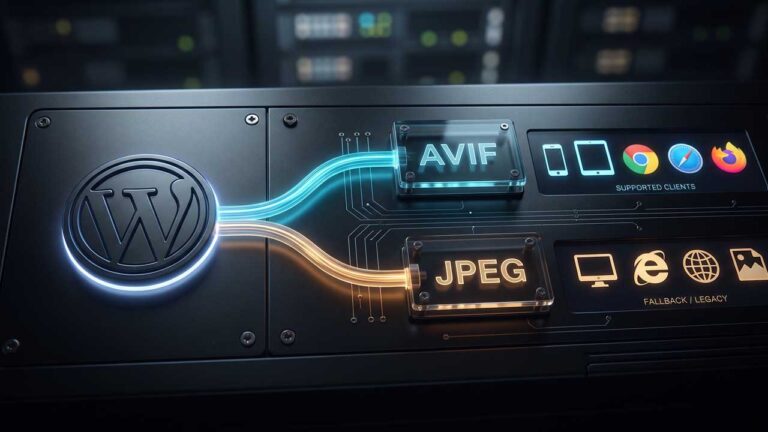
A familiar sequence: the upload succeeds, the media library shows a thumbnail, Chrome renders the page, and the work looks finished. Then someone opens the same page in Safari on a laptop from 2022 and gets an empty box where the hero image should be.
Nothing in the dashboard warned anyone. The file passed every check it was asked to pass. The problem is that “WordPress supports AVIF” and “your site serves AVIF to browsers that can read it” are two different features wearing one name, and only the first one shipped.
One Format, Two Jobs
Accepting a file and choosing a file happen in different layers, at different times, decided by different software.
The upload is a MIME-type check. WordPress hands the file to PHP’s image editor — GD or Imagick — and that library either understands AVIF or does not. If it does, the file is stored, thumbnails are generated, and the attachment behaves like any other image. If it does not, the upload is rejected before it reaches the library.
The second job happens later, in the browser, after the HTML has been parsed. Something has to tell the browser which of the available files to fetch. If nothing does, the browser fetches whatever URL is sitting in src — whether it can decode that file or not.
web.dev is blunt about the outcome: “A browser that doesn’t support a given encoding won’t be able to parse that image file at all… The browser will request the image data, attempt to parse it, and upon failing, will discard it without rendering anything at all.”
That failure is invisible from the server’s side. A 200 response, the correct number of bytes, and an empty box on the screen.
What 6.5 Actually Shipped
The core dev note that introduced the format states the claim plainly:
WordPress 6.5 supports AVIF, a modern image format that offers significant improvements in image quality and compression over previous formats like JPEG, PNG, and even WebP. AVIF images can be up to 50% smaller than JPEGs while maintaining the same image quality.
The scope line matters more than the compression line:
From WordPress version 6.5 forward, you can upload and use AVIF images in WordPress just like you would a JPEG or PNG image today – as long as your hosting environment supports AVIF.
And the reassurance that the existing machinery keeps working:
AVIF images still get all of the benefits of the responsive images, Fetch Priority, and lazy loading that WordPress supports by default.
Read together, those three sentences say: smaller files, upload parity, and no loss of srcset, fetchpriority or loading. All true. None of them is about negotiation.
The Part That Did Not Ship
The most useful paragraph in that dev note is in the comments, not the body. A reader asked whether WordPress 6.5 would generate an AVIF alongside a JPEG and serve whichever the browser could read. The author’s answer is the clearest statement of the gap that exists:
This change adds support for AVIFs in core letting you use them like a JPEG – it doesn’t offer the advanced features you describe where the browser is served an image based on its capabilities.
Two replies down, the sanctioned alternatives:
to serve images with an image CDN which can provide both client negotiation and edge serving. Also good would be serving images using the
<picture>element to serve AVIF’s with a JPEG fallback for non supporting browsers. We don’t yet directly support this in core yet – this ticket covers adding it.
So there are two honest routes — a CDN that negotiates on the server, or markup that offers a choice on the client — and WordPress’s own image function produces neither. wp_get_attachment_image() returns an <img> element with srcset. Adding an AVIF to the media library does not put it in that tag, and the browser will only fetch the URL it is given.
Who Is Still Getting the JPEG
The reason a fallback is needed is not that browsers are old. It is that the support is uneven in specific, well-documented ways.
caniuse’s AVIF table, read in November 2026, puts global support at 96.69% of tracked users. The version figures underneath that number are more informative than the total.
| Browser | AVIF from | Caveat recorded by caniuse |
|---|---|---|
| Chrome (desktop) | 85 | — |
| Firefox | 93 | — |
| Safari (iOS) | 16.0 | Still images only; animated sequences not supported |
| Safari (macOS) | 16.1 | macOS 13 Ventura or later; still images only; no noise synthesis |
| Samsung Internet | 14.0 | — |
| Global | — | 96.69% y, 0.02% partial |
Three details in that table explain most of the broken images people report.
The macOS floor is Ventura. Safari 16.1 runs on macOS 13 and later only, so a Mac on Monterey or Big Sur cannot decode AVIF regardless of which Safari build it has. Those machines are not ancient, and in offices they are common.
Still images only. Animated AVIF sequences — the case where a GIF replacement would save the most bytes — are not supported in Safari’s implementation. If a site uses animated AVIF for a looping product demo, the fallback matters more, not less.
96.69% is a share of users, not a share of pages. A three-percent gap on a page with eight product images is eight chances to show a blank box per visitor in that group.
Two Ways to Offer the Choice
Both routes solve the same problem — the browser must be able to pick — but they make the decision in different places.
The CDN route. An image CDN reads the Accept header the browser sends, converts or looks up the matching format, and returns it. The HTML never changes: one URL, several possible responses. It is the smaller job on the site side and the larger dependency on a vendor.
The markup route. The page lists its options and the browser chooses at parse time. MDN describes the mechanism: “The browser will consider each child <source> element and choose the best match among them. If no matches are found—or the browser doesn’t support the <picture> element—the URL of the <img> element’s src attribute is selected.”
The selection attribute is type, and MDN is explicit about the behaviour: “If the user agent does not support the given type, the <source> element is skipped.”
That means the order in the markup is the whole policy. Best format first, fallback last, and the <img> never left without a readable file.
<?php
/**
 * Emit <picture> with AVIF and WebP sources, JPEG as the fallback.
 * Works with any optimiser that writes photo.avif / photo.webp beside photo.jpg.
 */
function awplife_picture( $attachment_id, $size = 'large', $alt = '' ) {
	$img = wp_get_attachment_image_src( $attachment_id, $size );
	if ( ! $img ) {
		return;
	}

	$src     = $img[0];
	$baseurl = preg_replace( '/\.(jpe?g|png)$/i', '', $src );
	$uploads = wp_get_upload_dir();
	$base    = str_replace( $uploads['baseurl'], $uploads['basedir'], $baseurl );

	$formats = array(
		'image/avif' => '.avif',
		'image/webp' => '.webp',
	);

	echo '<picture>';

	foreach ( $formats as $mime => $ext ) {
		if ( ! file_exists( $base . $ext ) ) {
			continue;
		}
		printf(
			'<source srcset="%s" type="%s">',
			esc_url( $baseurl . $ext ),
			esc_attr( $mime )
		);
	}

	printf(
		'<img src="%s" width="%d" height="%d" alt="%s" loading="lazy" decoding="async">',
		esc_url( $src ),
		(int) $img[1],
		(int) $img[2],
		esc_attr( $alt )
	);

	echo '</picture>';
}
Three choices in that function are deliberate.
file_exists gates every <source>. A <source> pointing at a file the optimiser never wrote is worse than no <source>: the browser skips nothing, requests a 404, and falls back only after the round trip. Checking the disk costs one stat call per candidate and removes that failure entirely.
The format order is fixed. AVIF first, WebP second, JPEG in the <img>. Reversing it serves the larger file to the browsers that could have taken the smaller one, and the page gets slower without any error appearing.
Width and height live on the <img>, not on the <source>. They describe the rendered box, which is the same for every candidate, and keeping them in one place avoids the layout shift that comes from a missing attribute.
What the function does not do is add width descriptors to the sources. For a single size that is fine. For a responsive hero you want srcset on each <source> with the same w descriptors as the fallback — otherwise the browser picks one AVIF and scales it, and you have traded a format win for a resolution loss.
The Check That Proves Which Route You Are On
A page can look correct and still be sending the same JPEG to everyone. One command settles it, because the Accept header is exactly what a negotiating CDN reads.
URL="https://example.com/wp-content/uploads/2026/11/hero.jpg"

for ACCEPT in "image/avif,image/webp,*/*" "image/webp,*/*" "*/*"; do
  TYPE=$(curl -s -o /dev/null -D - -H "Accept: $ACCEPT" "$URL" |
    awk 'tolower($0) ~ /^content-type:/ { gsub(/\r/, ""); print $2; exit }')
  printf '%-26s -> %s\n' "$ACCEPT" "${TYPE:-none}"
done
One content-type returned three times means nothing is negotiating — you are serving whatever was uploaded, and the fallback has to come from the markup. Three different values means the CDN or the server module is doing the work, and the HTML can stay as it is.
Run it against a JPEG that has an AVIF sibling. Running it against the .avif URL itself proves nothing, because a static file server returns that file to everyone.
If the answers do differ, check one more header before calling it done: Vary: Accept. Content negotiation without it lets a cache store the AVIF response and hand it to the next visitor, which is the same broken image with an extra step and no way to reproduce it locally.
The 7.1 Detail That Moves the Hosting Caveat
The “as long as your hosting environment supports AVIF” clause has been the practical blocker for a lot of sites: shared hosts running an older Imagick simply refuse the upload. That is the situation the image upload troubleshooting guide covers, and it is usually a library problem rather than a permissions problem.
A July 2026 core dev note describes a change that alters where that failure occurs. WordPress 7.1 ships client-side media processing, which “handles image compression, resizing, format conversion, rotation, and thumbnail generation directly in the user’s browser using WebAssembly, rather than on the server.” The feature is enabled by default in supporting browsers.
The consequence is stated directly in the same note: “Hosts whose PHP image editor doesn’t support AVIF can still accept AVIF uploads when client-side processing is active. The MIME-type check is bypassed for client-decoded uploads.”
So the upload check now depends on the browser doing the upload, not only on the server receiving it. Two practical readings:
- A host that could not take AVIF last year may take it now, in Chrome and Edge, and still reject it from an older browser or a mobile app that posts to the REST API.
- The old advice — “your host does not support AVIF, so convert to WebP” — is no longer a safe diagnosis. Test the actual upload path rather than the server’s reputation.
None of this changes the serving question. A file that arrives through the browser is still stored as a file, and the page still has to tell the browser when to use it.
Where AVIF Is the Wrong Answer
Format choice is not a blanket upgrade, and three cases are worth naming.
Hard-coded .avif in src. This is the failure web.dev describes, and it is common in hand-built pages and page-builder custom HTML. It works in every browser the author tested and breaks in a measurable minority. The fix is not a better encoder; it is a <picture> or a CDN.
Images that are already vectors or already tiny. An SVG logo is smaller and sharper than any raster AVIF of the same mark. A 40×40 icon gains little from a format with per-file overhead. The compression argument applies to photographs, and the biggest wins are on the images that dominate the page.
Anything that depends on the fallback never being needed. A theme that prints AVIF sources and omits the <img> fallback has not implemented <picture>; it has implemented a bet. The <img> is not optional in the specification, and the <picture> element is defined as zero or more <source> elements followed by one <img>.
The image optimisation guide covers the format menu as a whole, including where WebP is the simpler choice. AVIF is the best of the three on bytes for photographs. It is also the one with the shortest support history, which is exactly why it needs the fallback.
A Sequence That Does Not Waste an Afternoon
- Ask the server what it can decode. One line, no plugin:
wp eval 'var_dump( wp_image_editor_supports( array( "mime_type" => "image/avif" ) ) );'The function reference describes it as testing “whether there is an editor that supports a given mime type or methods” and returning a boolean.truemeans uploads will be processed.falsemeans they will be rejected unless client-side processing handles them first. - Convert one image, not the library. The compressor and resizer roundup lists tools that write AVIF from an existing JPEG. Start with the hero image that appears on the most pages, because that is where the bytes are.
- Serve it with a choice. Add the
<picture>wrapper, or turn on CDN negotiation if the host provides it. - Prove it with the curl loop. One content type means you have work left; three means you are done.
- Check
Vary: Acceptif a CDN is in front, then hard-refresh in Safari and confirm the image appears. - Leave the lazy loading alone. The
loadingattribute decides when the request fires, not which file it gets — the lazy load guide explains the cases where removing it is correct. Changing format does not change that behaviour, and disabling lazy loading to fix an AVIF problem fixes the wrong thing.
For galleries the arithmetic changes slightly, because one page can carry thirty images and the fallback doubles the files on disk. The gallery performance walkthrough covers that case, and the CDN comparison is the place to look if negotiation at the edge is the route you want.
FAQ
Does WordPress support AVIF?
Yes, since 6.5 — as an upload format. You can add an AVIF to the media library and use it like a JPEG, provided the host’s PHP image editor can decode it. WordPress does not generate alternative formats or choose between them for the browser.
Does AVIF hurt SEO?
Not by itself. Google’s image documentation lists the formats Search supports in img src: “BMP, GIF, JPEG, PNG, WebP, SVG, and AVIF.” The risk is not the format; it is serving AVIF to a browser that cannot decode it, which produces a broken image on a page Google may still try to evaluate.
Is a plugin required to serve AVIF?
Not required, but it is the usual route. A plugin either writes the <picture> markup or hooks into a CDN. The alternative is theme code like the function above, which is roughly thirty lines and no dependency.
Should every image become AVIF?
No. Photographs gain the most. SVG marks, tiny icons, and images that are already compressed to a small size gain little, and each conversion adds a file to maintain. Convert the images that dominate the page and leave the rest.
