

“If you are trying to win high-ticket clients, a slow WordPress portfolio gallery is a major liability.
Picture this scenario: You are sitting in a coffee shop with a potential high-ticket client. They ask to see your past work. You pull up your website on your phone, click “Portfolio,” and… nothing happens. Just a loading spinner. The client waits. 5 seconds pass. Then 10. By the time your beautiful, raw 5MB JPEGs finally render, the conversation has moved on—and you’ve lost the deal.
This isn’t an exaggeration. According to modern web performance metrics, every single 100ms delay in page load time drops your site’s conversion rate by 7%.
If you are a designer, developer, photographer, or agency owner using a visual showcase to win business, a slow-loading site is actively draining your bank account.
Historically, building an interactive showcase meant loading heavy custom databases, bloated jQuery scripts, and massive page builder widgets. But in 2026, you don’t need to touch a single line of code to build a lightning-fast showcase.
Here is the exact developer-grade blueprint to building a highly responsive, filterable portfolio grid that loads in under 1 second.
1. Stop Uploading Raw Images (The Real Speed Killer)
Let’s be honest: if you are still uploading raw PNGs or JPEGs straight from Figma or your camera to WordPress, you are killing your search rankings. Images represent over 70% of a portfolio page’s total weight.
To build a speed-optimized layout, you must execute three strict optimization steps before any asset touches your WordPress media library:
Convert to WebP or AVIF
JPEGs and PNGs are legacy formats. WebP is the modern standard for web layouts. It provides identical visual quality to a high-resolution JPEG but reduces the actual file size by 25% to 30%. You can use free web tools like Squoosh or TinyPNG to run bulk conversions in seconds.
Scale for the Rendered Grid, Not Desktop Resolution
Do not upload a 5000px wide image if it will only display inside a 400px wide column on your portfolio page. Scale your thumbnail assets to a maximum width of 800px. Keep a high-resolution version (maximum 1920px wide) only if you are using a popup lightbox feature.
Set Hard Performance Budgets
To guarantee a sub-second load time, you must stick to a strict file-weight budget:
- Grid Thumbnails: Maximum 100KB per image.
- Lightbox Images: Maximum 300KB per image.
2. Bypass Page Builder Bloat
Modern visual builders (like Elementor or Divi) are fantastic for prototyping, but setting up a wordpress portfolio gallery using their native widgets can be notoriously bloated. They load massive stylesheets, duplicate jQuery scripts, and generate nested HTML wrapper divs that slow down browser rendering.
The fastest way to load a gallery is to bypass page-builder modules entirely and use a dedicated, lightweight wordpress portfolio gallery plugin.
Using a lightweight tool like Portfolio Filter Gallery keeps your database footprint microscopic. The plugin generates clean, modern CSS grids and outputs pure HTML that browsers can read and render in a fraction of a second.
The No-Code Implementation:
- Go to your WordPress dashboard, navigate to Plugins > Add New, and search for the wordpress portfolio gallery plugin by AWPLife.
- Once activated, go to Portfolio Gallery > Add New Gallery.
- Upload your pre-optimized WebP images and tag them with descriptive category filters (e.g., Web Design, Print, Logos).
- Copy the generated shortcode (e.g.,
) and drop it into a standard shortcode block on your site.
Pro Tip: If you want a perfectly styled showcase but don’t have the time to configure column widths, color schemes, or filter interactions yourself, you can outsource the technical heavy lifting to professional WordPress services to get it launch-ready in 24 hours.
3. Enable Instant, Client-Side AJAX Filtering
If a visitor clicks on a category filter (e.g., sorting your work to only show “Logo Design”) and the entire page has to reload, your site has failed the mobile UX test.
Outdated portfolio plugins query the WordPress database every time a filter is clicked. This creates a sluggish loop of server requests, white screens, and high bounce rates.
To prevent this, make sure your portfolio uses client-side AJAX sorting.
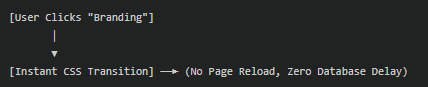
With client-side sorting, all gallery items are loaded securely in the background on the initial page load. When a user clicks a filter tab, a micro-script instantly applies a smooth CSS transition to hide the irrelevant thumbnails and snap the matching items into place. The sorting feels instantaneous, interactive, and premium.
4. Tackle Cumulative Layout Shift (CLS)
Have you ever visited a wordpress portfolio gallery where the layout shifts or text jumps down suddenly because a slow image just popped in? That is called Cumulative Layout Shift (CLS), and Google actively penalizes websites that do it.
Portfolios are highly vulnerable to CLS because grid columns can dynamically shift sizes as thumbnails of varying dimensions load.
To eliminate layout shifts, follow these two best practices:
- Define Image Dimensions: Ensure your gallery plugin explicitly sets the
widthandheightattributes on every HTML image tag. This reserves a blank placeholder box in the layout so the page doesn’t shift when the image loads. - Pure CSS Masonry: Avoid scripts that rely on complex JavaScript math to arrange grid items. A modern layout should rely on pure CSS Grid or flexbox layout parameters, letting the browser’s rendering engine calculate the exact layout positions instantly.
5. Monetize Your Showcase: The WooCommerce Bridge
For many agencies and creative studios, a portfolio isn’t just a static display—it’s a sales funnel. If you sell digital mockups, design templates, art prints, or creative consulting packages, you should bridge the gap between inspiration and transaction.
Using a premium filterable portfolio grid allows you to link specific portfolio items directly to your WooCommerce checkout flow.
Instead of forcing a client to read about your project, navigate to a separate shop page, search for the item, and add it to their cart, you can display a direct “Add to Cart” or “Buy Now” button inside the lightbox popup. This cuts friction out of the buying journey and significantly increases your visual sales conversions.
6. Audit Your Portfolio Like a Developer
Once your wordpress portfolio gallery is live, do not guess its performance—measure it. Put it to the test using free developer tools:
PageSpeed Insights (Google Lighthouse)
Run your URL through Google’s official speed tester. Aim for a Performance Score above 90 on both mobile and desktop. Pay close attention to the Largest Contentful Paint (LCP) metric—if it takes longer than 2.5 seconds, go back and compress your images further.
GTmetrix
Check the total page weight. For a fast-loading page, your total page transfer size should stay under 1.5MB on the initial visit.
The Ultimate Portfolio Launch Checklist
- All thumbnails compressed under 100KB using WebP format.
- Image resolution scaled to a maximum of 800px width for grid display.
- Native browser lazy loading (
loading="lazy") enabled. - Instant AJAX client-side filtering configured to eliminate page reloads.
- Explicit width and height attributes applied to image tags to prevent CLS.
- Direct call-to-action buttons added to lightbox popups for seamless client inquiries.
Ready to build a gorgeous, speed-optimized visual grid that converts visitors into paying clients? Try Portfolio Filter Gallery today to transform your WordPress site with a lightning-fast visual showcase.
