
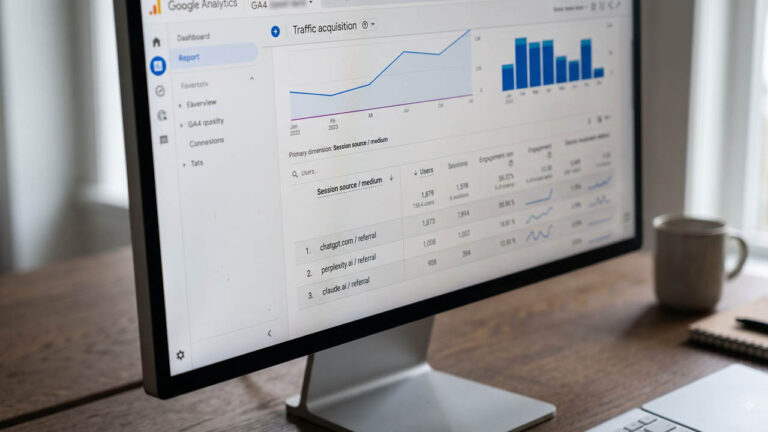
Open GA4, go to Reports → Acquisition → Traffic acquisition, and sort Direct by sessions, descending. For most sites in 2026, some of that “Direct” is not direct at all. It is a visitor who read a ChatGPT answer, clicked a citation, and arrived without a referrer header. GA4 cannot see the difference, so it files them as direct.
That gap used to be worse. In May 2026, Google added a native AI Assistant channel to GA4’s default channel group, which finally separated recognized AI referrals from ordinary referral traffic. It was a real improvement, and it is also incomplete: it misses at least one major assistant, it never sees referrer-less visits, and it does not count AI Overviews at all.
This guide covers both halves. First, where to read the native channel in 30 seconds. Then the custom channel group that closes the gaps and, unlike the native channel, applies to your historical data. Then how to see conversions per platform, and what GA4 will never show you no matter how you configure it.
What GA4 Does Automatically Now
Since May 2026, the default channel group includes an AI Assistant channel. No setup, no tag changes, no GTM work.
When GA4 detects a referrer that matches a recognized AI assistant, it does three things at once:
- Sets the session medium to
ai-assistant - Sets the campaign to
(ai-assistant) - Files the session under the AI Assistant channel
Google’s default channel group documentation defines it as traffic “from sources like ChatGPT, Gemini, Deepseek, Copilot, or Grok.” The same page states plainly that it excludes Google’s AI Overviews and AI Mode — those remain under Organic Search, by design.
To read it, you do not need a custom report:
- Open Reports → Acquisition → Traffic acquisition
- Set the primary dimension to Session default channel group
- Look for the AI Assistant row
If the row is missing, the rollout has not reached your property, or you are viewing a custom channel group — custom groups do not inherit new default channels automatically.
[IMAGE: shot-01-ai-assistant-channel.png — GA4 Traffic acquisition report with the AI Assistant row visible] alt text: GA4 Traffic acquisition report showing the AI Assistant channel with sessions, engagement rate and key events.
What the Native Channel Misses
The native channel is a floor, not a ceiling. Four gaps matter:
| Gap | What happens | Where the traffic lands |
|---|---|---|
| Assistants Google does not recognize | Not tagged ai-assistant | Referral |
| Referrer-less visits (mobile app, copy-paste, in-app browser) | No referrer to match | Direct |
| AI Overviews and AI Mode | Excluded from the channel by design | Organic Search |
| Crawlers (GPTBot, ClaudeBot, PerplexityBot) | Never execute GA4’s JavaScript | Not in GA4 at all |
Google has not published the full list of referrers it recognizes. Its help center names ChatGPT, Gemini, DeepSeek, Copilot and Grok. Third-party reporting is split on whether Claude and Perplexity are included — some tests find Perplexity still landing in Referral, others claim broader coverage. Do not take either claim on faith; check your own Source dimension. That is the whole point of the next section.
There is one more gap that surprises people: the native channel is applied going forward. A custom channel group, by contrast, can be applied to your reports retroactively. If you want to know what AI traffic looked like last quarter, the custom group is the only way to get it.
Build the AI Assistants Custom Channel Group
This is the setup that fixes the first two gaps. You need Editor access or higher.
- Go to Admin → Data display → Channel groups
- Find the Default channel group and choose Copy to create new. Name it something like “Channels incl. AI”
- Click Add new channel and name it AI Assistants
- Add the first condition: Source → matches regex → paste the pattern below
- Click Or and add a second condition: Medium → exactly matches →
ai-assistant. This keeps everything Google already tags natively, so nothing is lost - Drag AI Assistants above Referral (and above Unassigned)
- Save the group
Step 6 is where most setups quietly fail. GA4 assigns each session to the first channel whose rules it matches. If Referral sits above your new channel, perplexity.ai is claimed by Referral before your rule is ever evaluated, and your AI channel looks empty.
[IMAGE: shot-02-custom-channel-group-reorder.png — GA4 channel group editor with AI Assistants dragged above Referral] alt text: GA4 channel group editor showing the AI Assistants channel positioned above Referral in the channel order.
A word on limits: GA4 caps how many custom channel groups a property can hold, so do not spend a slot on a throwaway. Name this one clearly and keep it.
The Regex, and Why Google’s Example Overmatches
Google’s own help page includes a sample regex for AI assistants. It works, but it is broad:
^.*ai|.*.openai.*|.*chatgpt.*|.*gemini.*|.*gpt.*|.*copilot.*|.*perplexity.*|.*bard.*
The ^.*ai fragment matches any source containing the letters “ai” — including airbnb.com, airtable.com, and a surprising number of others. On a site with a lot of referral traffic, that quietly inflates your AI channel and makes it useless for comparison.
Use an anchored list instead. Because the Session source dimension holds the referrer domain without https:// or www., you can match exact domains:
^(chatgpt\.com|chat\.openai\.com|openai\.com|perplexity\.ai|claude\.ai|gemini\.google\.com|bard\.google\.com|copilot\.microsoft\.com|deepseek\.com|chat\.deepseek\.com|grok\.com|x\.ai|you\.com|poe\.com|meta\.ai)$
What that covers:
| Domain | Platform |
|---|---|
chatgpt.com, chat.openai.com, openai.com | ChatGPT |
perplexity.ai | Perplexity |
claude.ai | Claude |
gemini.google.com, bard.google.com | Google Gemini |
copilot.microsoft.com | Microsoft Copilot |
deepseek.com, chat.deepseek.com | DeepSeek |
grok.com, x.ai | Grok |
you.com, poe.com, meta.ai | Other assistants |
Keep this list in a note somewhere you will find it again. New assistants appear, and a regex you set once and forgot will quietly stop matching.
Confirm Per-Platform in an Exploration
A channel called “AI Assistants” tells you the total. It does not tell you whether ChatGPT, Perplexity, or Claude is doing the work. For that, open an Exploration:
- Explore → Blank exploration
- Add dimensions: Session source / medium and Session campaign
- Add metrics: Sessions and Key events
- Add a filter: Session source matches regex → the same pattern from above
- Sort by sessions
[IMAGE: shot-03-exploration-source-medium.png — GA4 exploration filtered to AI sources, broken down by source and medium] alt text: GA4 exploration showing sessions and key events broken down by AI source and medium.
You will usually see two kinds of rows: chatgpt.com / referral and, where Google’s native tag applied, chatgpt.com / ai-assistant. Both are the same traffic hitting your site by two classification paths. That is expected, and it is why the custom channel uses OR — you want them in one bucket, not two.
This is also how you settle the Perplexity question for your own property. If perplexity.ai shows up with medium referral, Google is not tagging it and your custom channel is doing the work. If it shows ai-assistant, the native list has expanded.
Track Conversions by AI Platform
Sessions are the easy part. The useful question is whether AI visitors convert, and at what rate.
Switch your report’s primary dimension to Session custom channel group, then compare the AI Assistants row against Organic Search and Direct on the same key events. Do it in Reports → Acquisition → Traffic acquisition for the quick version, or in an Exploration if you want the per-platform split and the conversion rate side by side.
Three practical notes:
- Use at least 28 days. AI referral volumes are still small on most sites. A week of data will show you noise and call it a trend.
- Compare rates, not totals. AI traffic is a fraction of organic traffic, so a lower session count is normal. A higher key-event rate is the signal worth chasing.
- Check the landing pages. AI visitors often land on a specific cited article rather than your homepage, which changes what you should optimise. If your conversions run through WooCommerce, our guide to GA4 for eCommerce covers revenue and purchase reporting by channel.
The Traffic GA4 Will Never Show You: Crawlers
Here is the distinction that trips up most reports. Two different things wear the “AI” label:
- Human referrals — a person clicks a citation in ChatGPT, Perplexity, or Claude. GA4 can see these, because a browser runs the GA4 script.
- Crawler hits — GPTBot, OAI-SearchBot, ClaudeBot, PerplexityBot and similar agents fetch your pages to train models or build an index. They do not run JavaScript, so GA4 never records them.
That second category is invisible to GA4 no matter how you configure it. It lives in your server or CDN logs, filtered by user agent. OpenAI documents its agents, including GPTBot and OAI-SearchBot, in its bot documentation.
Why it matters: a page can be crawled heavily by AI systems and send almost no clicks, because the assistant answered the question without linking out. If you only look at GA4, you will conclude AI does not care about your site. The server logs say otherwise. Keep the two measurements separate and never add them together.
If you want the wider context of how AI answers are changing search discovery, we covered it in Is SEO Dead? Navigating the Generative Search Revolution and the 12-month review of what moves WordPress rankings in 2026.
Where the Direct Bucket Hides AI Traffic
A custom channel group cannot fix a missing referrer. If the visitor arrives with no header, there is nothing to match, and GA4 will keep calling it Direct. You can still build a decent case that some of that Direct is AI, using four signals that are visible without any extra tooling.
The landing page is a document, not a homepage. Direct traffic normally skews to / because people type your domain or click a saved link. AI referrals skew to specific articles — the page that answered the question. A rising share of Direct sessions on deep posts, with a high engagement rate, is the pattern to look for.
The device is mobile and the browser is in-app. Filter the Direct segment by device category, then check the browser dimension. Traffic arriving through a chat app’s embedded browser behaves differently from a desktop visitor typing a URL.
The session starts and ends on one page, but the scroll depth is high. Referrer-less AI visitors often read the whole cited page and leave. That is the opposite of a bounce from a mistyped domain, even though both are single-page sessions.
The geography does not match your usual Direct pattern. If your Direct traffic is normally local and a chunk of it suddenly comes from markets where you have no brand recognition, an assistant answered a question in those markets.
None of these proves attribution on its own. Together they tell you whether the Direct line deserves a closer look, which is usually enough to justify keeping a monthly note rather than rebuilding your reporting.
For anything you need to keep beyond GA4’s retention window, export to BigQuery. Standard properties keep event data for 2 or 14 months depending on your setting, and the export is the only way to run this analysis against the same numbers two years from now.
Three Mistakes That Break the Setup
1. Leaving AI Assistants below Referral. The single most common failure. Rules evaluate top to bottom, so the new channel never fires. Reorder, then verify the row has sessions.
2. Assuming the native channel is retroactive. It is not. Only a custom channel group reclassifies history. If last quarter’s numbers look flat, that is why.
3. Using a regex that matches too much or too little. ^.*ai catches Airbnb. A list that omits chat.openai.com misses older ChatGPT links. Anchor the pattern, test it against your Source report, and revisit it when a new assistant appears.
One more, less obvious: ChatGPT appends utm_source=chatgpt.com to some links but no medium. Sessions with a source and no medium can fall outside both Referral and the native channel. The OR medium = ai-assistant clause plus a source regex that includes chatgpt.com catches most of them, but a few will still surface as Unassigned. Treat Unassigned as a place to investigate, not a place to ignore.
A 20-Minute Checklist
- Open Traffic acquisition and confirm the AI Assistant row exists
- Copy the default channel group and create AI Assistants
- Add the anchored source regex, plus OR medium =
ai-assistant - Drag the channel above Referral and save
- Open an Exploration and break sessions down by source to see the per-platform split
- Add Key events and compare the AI row against Organic Search over 28 days
- Check your server logs separately for GPTBot, ClaudeBot and PerplexityBot
If you are still setting up the property itself, start with Google Analytics for WordPress or the plugin-free GA4 setup first. And before you trust any of these numbers, make sure your own visits are excluded — our walkthrough on excluding internal traffic in GA4 covers the filter, because a single logged-in admin can distort a small AI channel badly.
FAQ
Does GA4 track ChatGPT traffic automatically?
Partly. Since May 2026, GA4 tags sessions whose referrer matches a recognized AI assistant with the medium ai-assistant and files them under the AI Assistant channel. Google does not publish the full list of recognized sources, and referrer-less visits are still missed.
Why is my AI traffic showing as Direct?
Because the visitor arrived without a referrer header. AI mobile apps, in-app browsers, and links copied out of a chat answer often strip it, so GA4 has nothing to attribute and defaults to Direct. Rising Direct traffic to deep article pages is a common signal.
Do AI Overviews show in the AI Assistant channel?
No. Google explicitly excludes AI Overviews and AI Mode from the AI Assistant channel. Clicks from those surfaces are counted as Organic Search, so they cannot be separated from ordinary Google results in GA4.
Can GA4 track GPTBot or ClaudeBot?
No. Crawlers do not execute JavaScript, so GA4 never records them. Use server or CDN logs filtered by user agent instead. Do not compare crawler hits with referral sessions — they measure different things.
How accurate is AI referral tracking in GA4?
It is a floor, not a total. Recognized referrals are captured; unnamed assistants, referrer-less visits, and AI Overviews are not. Treat the AI channel as the identifiable share and use server logs, branded-search lift, and citation monitoring to estimate the rest.
