
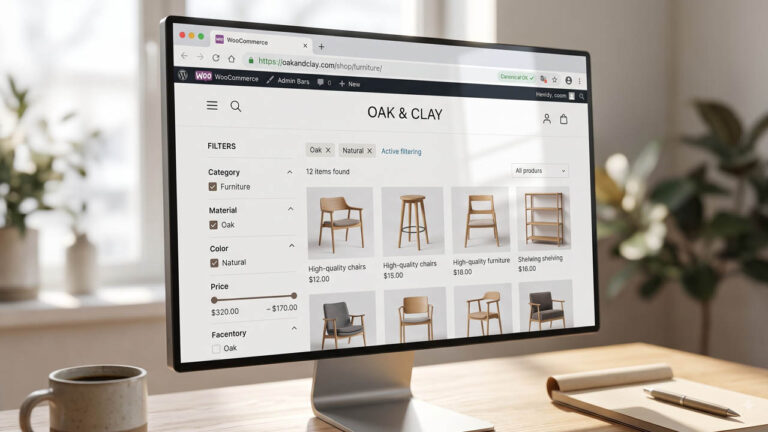
Open your shop page, view the source, and count the links that carry a query string. On a store with six filterable attributes, that number is usually in the hundreds. Every one of those links is a crawlable URL, and most of them return a page with three products and no unique text.
None of that is a duplicate content penalty. Google has been clear since long before this became a plugin feature: the harm from faceted navigation is crawl allocation. The faceted navigation guidance names two effects directly — overcrawling, where the crawler walks thousands of low-value URLs before giving up, and slower discovery, where new or updated pages wait behind that queue.
So the question is not “how do I remove duplicate URLs.” It is “which filtered URLs deserve to exist, and how do I stop the rest from consuming attention.”
That is a decision you make per filter, not per site. Stores get into trouble by picking one lever — usually robots.txt — and applying it to everything.
Count the URL Space Before You Argue About It
Before changing a setting, measure what the sidebar actually emits:
SITE="${SITE:?export SITE to your hostname first}"

curl -s "https://$SITE/shop/" \
  | grep -o 'href="[^"]*?[^"]*"' \
  | sed 's/^href="//; s/"$//' \
  | sort -u | wc -l
That prints the number of unique query-string links on one page. Run it on two or three category pages and compare. If the shop page emits 40 and a category emits 400, the category template is the problem, not the filter plugin.
Then break the count down by parameter, which tells you which filter is generating the space:
curl -s "https://$SITE/shop/" \
  | sed 's/&/\&/g; s/&/\&/g' \
  | grep -o 'href="[^"]*?[^"]*"' \
  | sed 's/^href="//; s/"$//' \
  | grep -o '[?&][a-zA-Z_]*=' \
  | tr -d '?&=' \
  | sort | uniq -c | sort -rn | head -20
If filter_pa_color returns 120 and everything else returns 15, you have one attribute doing all the damage. That is a much easier conversation than “we have a faceted navigation problem.”
Two Different Things Are Called Filters
WooCommerce produces filter URLs in two unrelated ways, and they fail differently.
Attribute archives are real pages. When you enable archives on a global attribute, WooCommerce creates /color/black/ as a term archive with its own template. The product taxonomy documentation describes the setting and the resulting URL. These pages can be linked from menus, can receive internal links, and can rank.
Layered navigation is a query parameter. Clicking a filter in the sidebar appends ?filter_color=black, and the same shop archive re-renders with a subset. No new page exists; the URL simply carries state.
Most stores enable both and end up with /color/black/, ?filter_color=black, and ?filter_color=black&query_type_color=or all live and all crawlable. Three URLs, one product set.
Decide which one is the public version before you touch anything else. If you sell “black running shoes” as a category, that category should exist and be linked. The parameter version should not compete with it.
Google Offers Four Levers, and They Interact Badly
The faceted navigation documentation lists four ways to manage these URLs: robots.txt, URL fragments, rel="canonical", and rel="nofollow" on the links. Each does something different, and choosing the wrong one produces a state that is hard to diagnose.
The critical interaction is this: a robots.txt block stops the crawl, which means Google never reads the noindex or the canonical on that page. Blocking is not a stronger version of noindex. It is a different outcome.
That outcome has a name. If a URL is disallowed in robots.txt but still linked from a crawlable page, Google can list it in results as a bare URL with no snippet, annotated as blocked by robots. The noindex documentation covers the distinction. You end up with the URL visible in Search Console, no consolidation signal delivered, and no way to fix it without unblocking first.
This is the single most common faceted navigation mistake: block in robots.txt, leave the sidebar links in place, and wonder why the index still contains 12,000 filter URLs a year later.
Three Buckets, Not One Rule
Sort every filter combination into one of three outcomes before writing any code.
Index. The filtered set has enough unique inventory and enough search demand to justify a page. “Women’s trail running shoes, size 9” might qualify if you have 40 of them and people search that phrase. These get a canonical pointing at themselves, a place in the sitemap, and internal links.
Consolidate. The filtered set is a subset of a page that already exists, and the combination adds no new inventory signal. Point rel="canonical" at the broader page. The canonical documentation explains that this is a hint, not a directive, and that consistency matters more than which page you pick.
Exclude. The combination is noise: sort orders, price sliders, multi-attribute stacks with two products, anything that produces an empty or near-empty result. Keep it out of the index, or keep it out of the crawl, and be deliberate about which.
The mistake is treating bucket three with a bucket-two tool. A canonical on a page Google is not allowed to crawl does nothing.
What WooCommerce Does on Its Own
Several defaults matter more than any plugin setting, and one of them works against you.
Attribute archives are opt-in per attribute. In Products → Attributes, “Enable archives” creates the /color/black/ term pages. If you only use an attribute to build variations, leave archives off. That single checkbox removes an entire URL class without touching SEO plugins.
Layered nav parameters are added by the widget, not by core. Core WooCommerce ships filter widgets, but the parameter names come from whatever renders the sidebar. Check the actual HTML, not the documentation, because a block-based filter and a legacy widget produce different URLs on the same store.
Sorting and pagination append their own parameters. ?orderby=price and ?paged=2 are not duplicate pages in the same sense as a filter, but they are additional crawlable states. Google no longer uses rel="next" and rel="prev" for indexing, so the pagination signal is weaker than it used to be. Do not build a strategy around those tags.
Two URL-level rules from the same guidance are worth enforcing while you are in the template. Keep & as the separator between parameters; commas, semicolons, and brackets are not reliably read as separators. And when a filter combination returns no products, serve a 404 rather than a 200 with an empty grid.
WooCommerce gets the second one wrong by default. An empty filter result is a normal archive with zero posts and a 200 status. The guidance is explicit that a combination with no results should return 404, and that redirecting to a generic “not found” page is not a substitute:
add_action(
    'template_redirect',
    function () {
        if ( ! is_shop() && ! is_product_taxonomy() ) {
            return;
        }

        if ( empty( $_GET ) ) {
            return;
        }

        if ( have_posts() ) {
            return;
        }

        global $wp_query;
        $wp_query->set_404();
        status_header( 404 );
        nocache_headers();
    }
);
This runs after the main query, so have_posts() reflects the filtered result rather than the unfiltered archive. Test it against a combination you know is empty, and check the status code rather than the page copy:
curl -s -o /dev/null -w '%{http_code}\n' \
  "https://$SITE/shop/?filter_color=not-a-real-color"
If a page cache serves the 404, exclude filtered URLs from full-page caching or purge after the change. A cached 200 will outlive the fix.
If the catalog is large enough that filter queries hit the database on every request, the WooCommerce scaling guide covers the caching and queue side, which is a separate problem from the crawl side but arrives at the same time.
Decide Which Filter URLs Earn an Index Entry
Use three tests. A combination has to pass all of them.
- Unique inventory. The filtered page shows products that the unfiltered page does not lead with, and the set is large enough to browse. Twenty products is a page. Two is a dead end.
- Demand. The phrase appears in your search console queries, in your site search logs, or in a keyword tool with real volume. If nobody searches “red waterproof jacket size XL,” the page is inventory, not a landing page.
- Stability. The combination is a real merchandising decision you will maintain. If it exists only because a customer clicked three checkboxes in a session, it should never have been linked from the sidebar.
The combinations that pass are usually one-parameter, occasionally two, and almost never three. That is the opposite of what a filter sidebar generates by default, which is every combination of everything.
Robots.txt Rules That Survive a Real Catalog
If you have decided the filtered URLs should not be crawled at all, block them by parameter name rather than by full URL. Wildcards are supported, and Google’s robots.txt introduction documents the syntax.
User-agent: *
Disallow: /*?filter_
Disallow: /*?min_price=
Disallow: /*?max_price=
Disallow: /*?orderby=
Disallow: /*?s=
Disallow: /*?add-to-cart=
Two details keep this from backfiring.
The trailing underscore in filter_ matches filter_color, filter_size, and any other prefixed parameter, but not ?filter=. Check which form your theme emits before relying on it.
And if any filtered URL must stay crawlable, add an explicit allow for that parameter. Google evaluates the most specific matching rule, so a narrow Allow: can carve out an exception:
Disallow: /*?filter_
Allow: /*?filter_brand=acme
What robots.txt cannot do is distinguish ?filter_brand=acme from ?filter_brand=acme&filter_color=black. A wildcard that permits the first also permits the second, because there is no way to exclude a character. If only the bare filter should be crawlable, handle the stacked versions with noindex instead of robots rules.
Verify the file is actually served and parsed before assuming it works:
curl -s "https://$SITE/robots.txt" | head -40
If a plugin is generating robots.txt dynamically, your hand-edited file at the web root may never be read. The robots.txt for WordPress piece covers where each plugin writes its rules, and the core sitemap guide explains what happens when two systems both claim the same file.
Noindex the Long Tail Without Blocking It
If the goal is to keep filtered URLs out of the index but still let Google read them — so it can see the canonical, follow the product links, and understand the hierarchy — use noindex, follow instead of a crawl block.
WordPress 5.7 and later expose a wp_robots filter that works whether or not an SEO plugin is active:
add_filter(
    'wp_robots',
    function ( array $robots ) {
        if ( ! is_shop() && ! is_product_taxonomy() ) {
            return $robots;
        }

        $prefixes = array( 'filter_', 'min_price', 'max_price', 'orderby' );

        foreach ( array_keys( $_GET ) as $key ) {
            foreach ( $prefixes as $prefix ) {
                if ( 0 === strpos( $key, $prefix ) ) {
                    $robots['noindex'] = true;
                    $robots['follow']  = true;
                    return $robots;
                }
            }
        }

        return $robots;
    }
);
Three cautions.
This runs on every request, so keep the parameter list short. Do not add a database call inside it.
noindex and canonical conflict. If a page says noindex, Google will drop it from the index and there is nothing left to consolidate. Pick one per URL. In practice: noindex for the long tail, canonical for the near-duplicates you want merged, and never both on the same URL.
Check the output, not the intent:
curl -s "https://$SITE/shop/?filter_color=black" | grep -o '<meta name="robots"[^>]*>'
If that prints nothing, an SEO plugin is overriding the filter, or your filter does not match the parameter name your sidebar actually uses.
Canonicalize the Near-Duplicates
Canonical is the right tool when a filtered page should still be crawlable and should still pass signals, but should not appear as a separate result. The most common correct case is a single filter that sorts or reorders the same inventory.
Point it at the unfiltered parent:
/shop/?filter_color=black -> /shop/
That is defensible when the filtered page adds no products the parent lacks. It is wrong when the filtered page is the only place a coherent product set appears. Canonicalizing “black running shoes” to “all products” tells Google the specific page is not worth ranking, and it usually is.
The rule I use: canonical to the parent when the child is a view of the parent. Keep self-canonical when the child is a subset with its own audience.
Consistency matters as much as the target. If some filtered URLs self-canonicalize, some point at the category, and the sitemap lists a third version, you have given Google three conflicting opinions and it will pick the one you like least.
Keep Filter URLs Out of the Sitemap
A sitemap is a statement that a URL matters. Including twenty thousand filter combinations in it undoes every other signal you send.
Core WordPress sitemaps include public taxonomies. If attribute archives are enabled, the term archives can appear as their own sitemap. Check for it directly:
curl -s -o /dev/null -w '%{http_code}\n' \
  "https://$SITE/wp-sitemap-taxonomies-pa_color-1.xml"
A 200 means that sitemap exists. Whether you keep it depends on the bucket decision from earlier — if /color/black/ is a real page you want ranked, the sitemap is fine. If attribute archives are accidental, turn them off at the source rather than filtering the sitemap afterward.
Query-string URLs should almost never appear in a sitemap. If they do, something is generating them from the navigation rather than from content.
The Audit
Run this after any change. Each step maps to a specific failure.
SITE="${SITE:?export SITE to your hostname first}"

# 1. How many query links does one category emit?
curl -s "https://$SITE/shop/" | grep -o 'href="[^"]*?[^"]*"' | sort -u | wc -l

# 2. Is a filtered URL crawlable at all?
curl -s -o /dev/null -w '%{http_code}\n' "https://$SITE/shop/?filter_color=black"

# 3. What does the page tell crawlers?
curl -s "https://$SITE/shop/?filter_color=black" | grep -o '<meta name="robots"[^>]*>'
curl -s "https://$SITE/shop/?filter_color=black" | grep -o '<link rel="canonical"[^>]*>'

# 4. Does robots.txt match the real parameter names?
curl -s "https://$SITE/robots.txt" | grep -i 'disallow: /\*?'

# 5. Is the attribute archive in the sitemap index?
curl -s "https://$SITE/wp-sitemap.xml" | grep -o 'wp-sitemap-taxonomies-[a-z_]*' | sort -u
The interpretation that matters: steps 2 and 4 must agree. If the URL returns 200 and robots allows it, the meta robots tag is your only control. If robots blocks it, the meta tag is invisible and you have chosen the blocked-indexed outcome whether you meant to or not.
Then leave it alone for a month. Crawl behavior changes on Google’s schedule, not yours, and a filter change that looks inert in week one often shows up as a drop in “crawled — currently not indexed” for the good pages by week six. Search Console’s page indexing report is where that shows up, and the indexing preparation guide covers the rest of the pre-crawl checklist if this is a new store.
Two adjacent costs are easy to forget. A store with heavy filter traffic also has a server cost — every uncached ?filter_ request can reach PHP — which is why the WooCommerce speed guide and the WooCommerce configuration walkthrough are worth reading alongside this one.
FAQ
Is faceted navigation duplicate content?
Not in the sense Google penalizes. Google’s guidance treats it as a crawl efficiency problem: too many low-value URLs consume crawl budget and delay discovery of pages that matter. The fix is allocation, not punishment avoidance.
Should I block filter URLs in robots.txt?
Only if you are certain you never want them indexed and you are also willing to remove the internal links that point to them. If links remain, Google can still list the URL as blocked by robots, and it will never read your canonical or noindex tag.
Noindex or canonical for filtered pages?
Canonical when the filtered page is a view of a page you already have and you want the signals merged. Noindex when the page should not appear in results at all. Never both, because noindex removes the page before canonicalization can do anything.
Should attribute archives be enabled?
Only for attributes you want to rank as landing pages. Archives create real URLs that can collect links and compete with your categories. If the attribute exists purely to generate variations, leave archives off and filter with parameters instead.
Do filter URLs hurt page speed?
They can, indirectly. Filtered requests often bypass full-page caching and reach PHP, so a crawler walking thousands of them costs origin capacity. The fix is a crawl decision first and a caching decision second, not the reverse.
How many filter combinations should be indexable?
Few enough that you could list them by hand. In most stores that is the one-parameter pages with real search demand, plus a small number of two-parameter combinations you maintain deliberately. Anything generated by a customer’s click path should not be in that list.
Does rel=”nofollow” on sidebar links help?
It can reduce crawl volume, but only if every link to that URL carries the attribute. One unfollowed link in a menu or a related-products block reopens the path. Google treats it as a weaker signal than robots or noindex, so use it as a supplement.
How long until the index reflects the change?
Weeks to months, depending on crawl rate. Google has to recrawl each URL to see the new tag, and blocked URLs have to be unblocked before anything can be read. Judge the result in Search Console’s indexing report over a full quarter, not in a site search the next morning.
