

Choosing a WordPress gallery plugin in 2026 is no longer just about visual aesthetics; it is about balancing high-resolution imagery with strict Core Web Vitals (CWV) compliance. A poorly optimized gallery is often the primary culprit for failures in Largest Contentful Paint (LCP) and Cumulative Layout Shift (CLS).
In this technical audit, we evaluate the 10 most popular free gallery plugins based on their rendering efficiency, Block Editor compatibility, and mobile responsiveness.
Technical Comparison Matrix
| Plugin | Rendering Engine | Lazy Loading | Gutenberg Support | 2026 Standard |
|---|---|---|---|---|
| Image Gallery | Vanilla CSS/JS | Native | Full | High |
| Photo Gallery (10Web) | jQuery/JS | Plugin-based | Block-based | Medium |
| NextGEN Gallery | Legacy Core | Optimized | Partial | Balanced |
| Robo Gallery | Minimalist JS | Native | Full | High |
1. Image Gallery (by AWPLife)

The Image Gallery plugin remains a top-tier choice for developers prioritizing lightweight execution. It utilizes a Bootstrap-based responsive grid that ensures layout stability across devices.
- Expert Insight: Its primary strength lies in the “Custom Post Type” architecture, which separates gallery assets from standard media library clutter, simplifying database queries.
- 2026 Performance: Native support for WebP and AVIF formats ensures minimal LCP impact.
- Live Demo | Download Free

The Image Gallery plugin remains a top-tier choice for developers prioritizing lightweight execution. It utilizes a Bootstrap-based responsive grid that ensures layout stability across devices.
- Expert Insight: Its primary strength lies in the “Custom Post Type” architecture, which separates gallery assets from standard media library clutter, simplifying database queries.
- 2026 Performance: Native support for WebP and AVIF formats ensures minimal LCP impact.
- Live Demo | Download Free
2. Photo Gallery (by AWPLife)

Designed for multi-media portfolios, this version integrates YouTube, Vimeo, and Map supports within a singular container.
- Technical Note: The shadow and glow transition effects are executed via hardware-accelerated CSS3, reducing the CPU overhead during user interaction.
- Live Demo | Download Free
3. Grid Gallery (by AWPLife)

Focusing on the “Masonry” and “Grid” layouts, this plugin is optimized for sites requiring rapid image retrieval.
- UX Advantage: Includes auto-scroll and navigation button positioning that does not interfere with mobile touch targets.
- Live Demo | Download Free

4. Instagram type Gallery
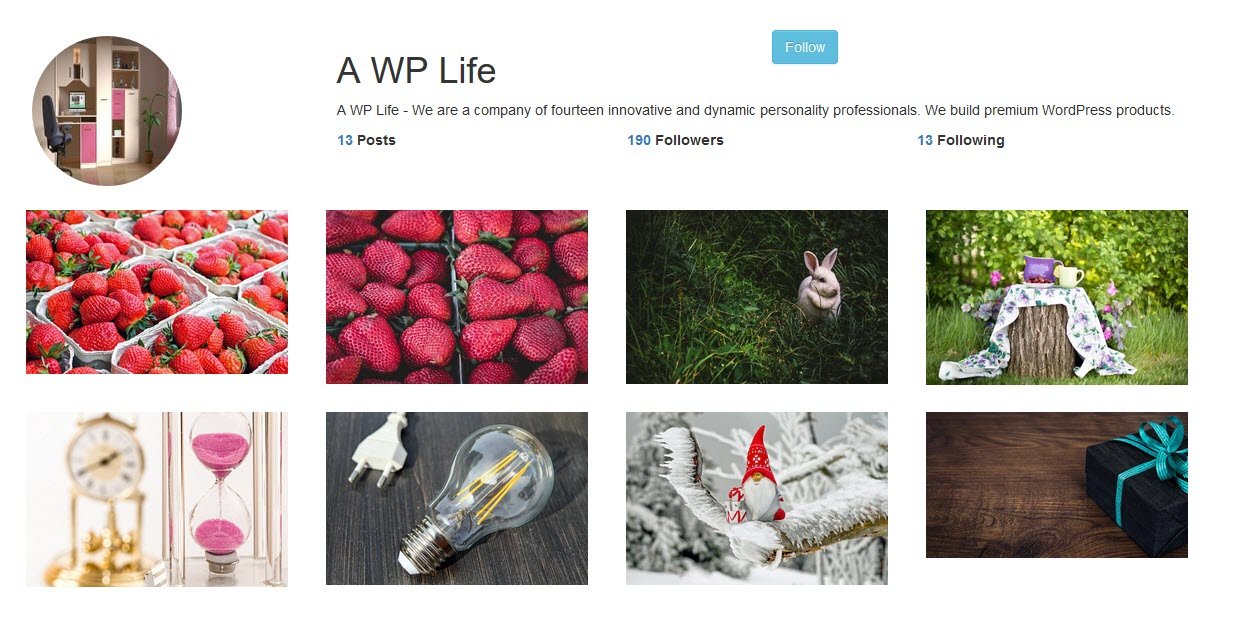
A responsive social-to-web bridge for Instagram feeds.
- UX Focus: Provides a seamless Lightbox style for social media images without leaving the parent domain.
- Live Demo | Download Free
5. Gallery – Album Gallery

Best suited for hierarchical content organization, allowing users to categorize multiple galleries into distinct albums.
- Performance Tip: Utilize the batch upload feature to reduce server-side execution time during content creation.
- Live Demo | Download Free
6. Flickr Album Gallery Widget & Shortcode

A specialized tool for offloading image hosting to Flickr via API, significantly reducing local server storage requirements.
- Technical Edge: Fast and light execution due to fetching processed thumbnails directly from Flickr’s CDN.
- Live Demo | Download Free
7. Photo Gallery (by 10Web)

An advanced plugin featuring a wide array of visual tools.
- Complexity: Highly flexible but may require aggressive script minification to maintain PageSpeed scores above 90.
- Download Free
8. NextGEN Gallery (by Imagely)

The industry standard since 2007. NextGEN is powerful but can be resource-intensive for simple sites.
Architecture: Provides a complete management system for photographers, including proofing and e-commerce extensions.
SEO Tip: Use the NextGEN “Pro” lightboxes for the better mobile CLS scores.
9. Gallery Images (by AccessPress)

A simplified approach for users needing a gallery in under five minutes.
- Compatibility: Features 7 incredible views with a friendly admin panel designed for non-technical users.
- Download Free
10. Robo Gallery

Robo Gallery is highly regarded for its “Polaroid” and “Classic” layouts that avoid common AJAX library conflicts.
- Developer Feature: Implemented in native WordPress style using core classes, making it highly compatible with caching plugins like WP Rocket.
- Download Free
Final Verdict: Which One Should You Choose?
- For Performance: Choose Image Gallery or Robo Gallery for their low script footprint.
- For Professional Photography: NextGEN Gallery or Photo Gallery (10Web) offer the best management suites.
- For Social Integration: Flickr Gallery or Insta Type Gallery are the refined choices for external API sourcing.
FAQ: WordPress Gallery SEO in 2026
Q: Do gallery plugins slow down my site? A: Yes, if they do not support native lazy loading or pre-fetching. Ensure your chosen plugin supports WebP and AVIF to minimize payload.
Q: Which gallery layout is best for mobile? A: A single-column or stabilized two-column masonry layout provides the best UX on smaller viewports where horizontal space is limited.
Further Reading for WordPress Performance
- Optimizing Site Visibility: Learn from our 2026 Sitemap Guide for better indexing.
- Image Efficiency: Audit your assets with the Top 20 Image Compressors.
- Premium Solutions: Explore our curated list of Premium WordPress Themes built for speed.
