

If you run a WooCommerce store, you probably know this feeling. Your WooCommerce dashboard shows the sales numbers. Google Analytics shows the traffic. The WooCommerce app pings you every time an order lands. And none of it answers the question you actually care about:
A product page gets a thousand views and sells once. Why?
That question sits at the heart of most store owners’ frustration. It’s not that nobody wants an answer — it’s that the tools we’ve been handed were never built to connect those dots. Each one looks at one slice of the business and ignores everything else.
Hippoo BI was built to fix exactly that. But to understand why it matters, it helps to see how store owners patch the gap today.
What’s Wrong With WooCommerce Reports Today
Here’s the short version: WooCommerce reports tell you what sold. That’s all. No traffic, no context, no clue why one product converts while the one next to it doesn’t.
The WooCommerce app is fine for a quick look at orders when you’re away from your desk. But it’s a rearview mirror, not a compass — it shows you what already happened, not what to do about it. And the report endpoints in the WooCommerce REST API? They were deprecated years ago. On plenty of stores, they simply return zeros.
So most store owners end up juggling three tools at once:
- WooCommerce reports for sales numbers
- Google Analytics for traffic
- The WooCommerce app for a quick order count
- Zero tools that connect them
You stitch together three dashboards, make your best guess, and hope the next tweak moves the needle.
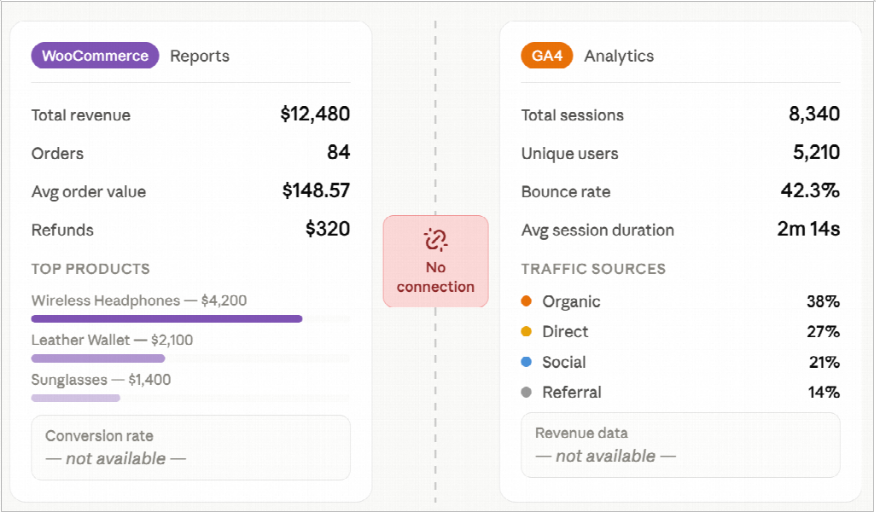
That’s not analytics. That’s noise.
Introducing Hippoo BI: WooCommerce Reports, Reimagined
Hippoo WooCommerce app Business Intelligence is a native analytics module built into the Hippoo plugin. Nothing extra to install, no third-party service to connect, and no data leaving your site.
It does what WooCommerce’s own reports were never designed to do: it puts traffic and sales side by side, then turns the combination into something you can actually act on. You stop asking “what sold?” and start asking “why did this one sell?” — and you get a real answer.
What You Actually Get
One Dashboard. The Full Picture.
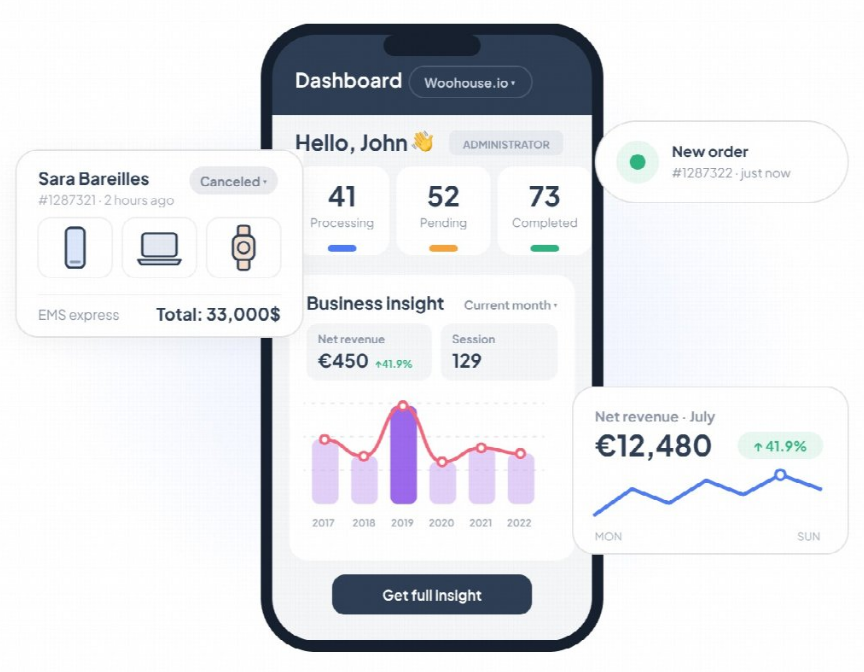
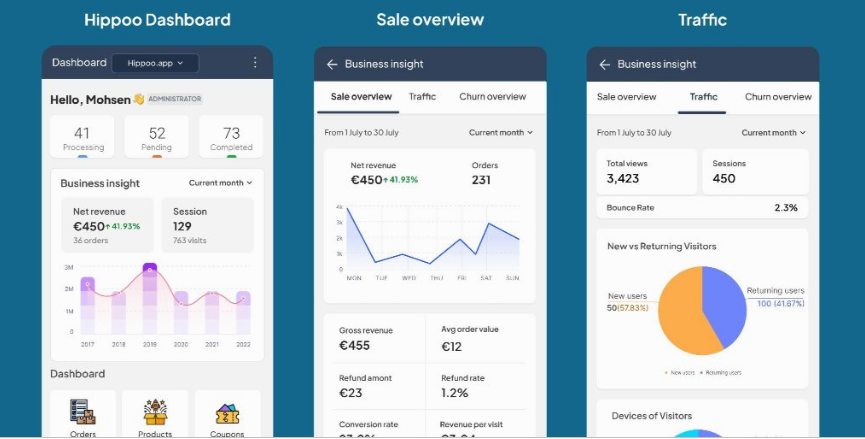
Open Hippoo BI and you get one screen instead of three:
- Net revenue, with a period-over-period comparison
- Conversion rate — real orders divided by real sessions
- Average order value
- Revenue per visit
- New vs. returning customers
- A combined chart with traffic and revenue on the same timeline
Everything the reports, the app, and Google Analytics hand you separately, finally in one view. No tab-hopping. No matching dates by hand.
Product Intelligence: The WooCommerce Report Your Products Deserve
This is where Hippoo BI parts ways with every WooCommerce report you’ve used before.
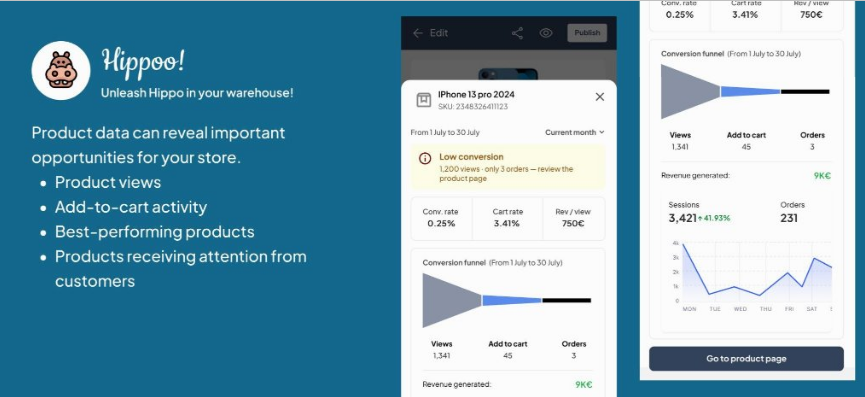
For each product in your store, it quietly tracks four numbers:
- how many people visited the product page
- how many added it to the cart
- how many actually bought it
- revenue per visit
Then it goes one step further and labels every product with a plain-English insight, so you don’t have to interpret the numbers yourself:
| Tag | What It Means |
|---|---|
| 🔴 High Traffic, Low Conversion | 1,200 visits. 3 sales. Something on this page is killing the deal. |
| 💎 Hidden Gem | Low traffic but exceptional conversion — this product needs more exposure. |
| ⚠️ Cart Drop | People add to cart but don’t check out — your checkout might have a problem. |
| ✅ Strong Performer | This is working. Replicate the formula elsewhere. |
| ⛔ Dead Product | Traffic exists, zero sales. Time to rethink this listing. |
No built-in report shows you this. No app notification tells you this. Hippoo does it automatically.
If conversion is your weak spot, our roundup of the best WooCommerce sales funnel plugins is a good place to start.
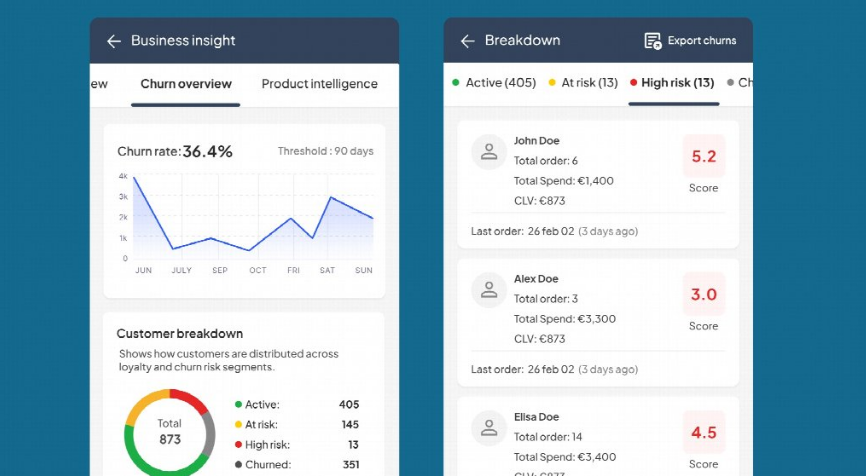
Churn Detection: The Report WooCommerce Forgot to Build
Research firm Invesp has pegged the cost of acquiring a new customer at about five times what it costs to keep an existing one. That’s a big number to ignore — and yet WooCommerce’s reports have no concept of churn. Nothing warns you that a customer is quietly drifting away until they’re already gone.
Hippoo BI tracks each customer’s purchase behavior and assigns a Churn Score, recalculated every night:
- 🟢 Active — no action needed
- 🟡 At Risk — time for a reminder or a discount
- 🟠 High Risk — reach out directly
- 🔴 Churned — launch a win-back campaign
Export the full list to CSV and drop it straight into your email marketing tool. It’s the customer report WooCommerce should have shipped years ago.
Built for Speed. Built for Privacy.
Analytics tools have a habit of slowing stores down. Hippoo BI was built around one hard rule: it should never get in the way of your visitors.
- Tracking uses sendBeacon, fully async, so page load times don’t change
- Heavy calculations run on a nightly cron, not on every request
- Results are cached intelligently — no Redis, no extra infrastructure
- IP addresses are never stored, only country codes
- Data is automatically pruned after 13 months
Fast for your visitors, light on your server, and easy to defend in a privacy conversation.
WooCommerce Reports vs. WooCommerce App vs. Hippoo BI
Here’s how the three compare on the metrics that actually matter:
| Feature | WooCommerce Reports | WooCommerce App | Hippoo BI |
|---|---|---|---|
| Sales data | ✅ | ✅ | ✅ |
| Traffic data | ❌ | ❌ | ✅ |
| Product-level conversion | ❌ | ❌ | ✅ |
| Automatic product insights | ❌ | ❌ | ✅ |
| Churn detection | ❌ | ❌ | ✅ |
| Combined traffic + revenue chart | ❌ | ❌ | ✅ |
| Runs without Jetpack | ✅ | ❌ | ✅ |
The official WooCommerce app needs Jetpack to connect to your store. Built-in reports run on your site itself; Hippoo BI does too.
The WooCommerce Report You’ve Been Missing
WooCommerce reports tell you what happened. The app tells you it happened. Hippoo BI tells you why it happened — and what to do next.
Whether you’re trying to fix a product page that won’t convert, catch customers before they slip away, or find the hidden gems in your catalog and give them the exposure they deserve, the answers are already sitting in your WooCommerce data. Hippoo BI just puts them on the screen.
Hippoo BI ships inside the Hippoo plugin and works with any WooCommerce store. If you already run Hippoo, the reports are waiting — no additional setup required.
Frequently Asked Questions
Is Hippoo BI a separate plugin?
No. It’s a module inside the Hippoo plugin. Install or update Hippoo and the BI section is there, ready to use.
Does Hippoo BI replace Google Analytics?
No, and it’s not trying to. Google Analytics is still useful for marketing and audience data. Hippoo BI focuses on what Google Analytics can’t do: connecting traffic to sales inside your store, at the product level.
Will Hippoo BI slow down my store?
No. Tracking is async (sendBeacon), heavy calculations run overnight, and results are cached. Visitors shouldn’t notice it’s there.
Do I need Redis or any extra infrastructure?
No. Everything runs on your existing WooCommerce setup.
What happens to my customer data?
IP addresses are never stored — only country codes — and data older than 13 months is pruned automatically. Nothing leaves your site.
