

If you run a WordPress website — whether it is a news portal, a corporate blog, an e-commerce store, or a personal site — there is one thing every visitor expects the moment they land on your homepage: fresh, relevant content delivered instantly. And there is no better way to achieve that than with a WordPress news ticker plugin. A scrolling news ticker grabs attention, communicates key updates, and keeps your audience engaged without taking up valuable screen real estate.
Table of Contents
But here is the problem. Most WordPress news ticker plugins on the market are outdated, bloated with jQuery dependencies, slow to load, and visually unappealing. They were built years ago with old-school code and have simply not kept up with the standards of modern web development. That is exactly why Floating News Headline was built from scratch — to be the fastest, most beautiful, and most developer-friendly news ticker plugin available for WordPress. And the best part? It is completely free.
In this detailed guide, we will walk you through every single feature and setting of the Floating News Headline plugin, show you exactly how to set it up, explain where and why you should use it, and give you a transparent comparison with other popular alternatives. By the end of this article, you will understand why thousands of WordPress users are switching to this modern, lightweight solution.
What Is the Floating News Headline Plugin?
Floating News Headline is a professional-grade WordPress news ticker plugin designed for speed, beauty, and zero theme conflicts. It displays breaking news, your latest blog posts, hand-picked headlines, or custom alert messages in a sleek, non-intrusive floating bar at the top of your WordPress site.
Unlike traditional ticker plugins that rely on heavy JavaScript libraries, Floating News Headline uses a completely modern tech stack:
- Vanilla JavaScript on the frontend — absolutely zero jQuery dependency
- GPU-accelerated CSS animations using
transform: translateX()for silky smooth 60fps scrolling - BEM (Block-Element-Modifier) CSS architecture — guarantees zero naming collisions with your theme
- WordPress Transient API caching — intelligent 10-minute caching to minimize database queries
- WordPress REST API — secure, nonce-verified communication between the dashboard and backend
- React-powered admin dashboard — a modern, instant live preview experience for settings management
The total frontend footprint is under 40KB (CSS + JS combined). No external CDN resources. No bloat. Just pure performance.
Why Do You Even Need a WordPress News Ticker Plugin?
Before we jump into the features, let us talk about why a news ticker matters for your website. Here are the real-world scenarios where a floating news ticker makes a massive difference:
1. News and Magazine Websites
If you run a news portal, a scrolling headline bar at the top of your site immediately communicates that your content is fresh and current. Visitors can see breaking headlines without scrolling, which increases time-on-site and encourages deeper engagement.
2. Corporate and Business Websites
Use the ticker to display company announcements, press releases, investor updates, or product launches. A “Corporate Classic” design template makes it look polished and professional without any code.
3. E-commerce and WooCommerce Stores
Announce flash sales, limited-time offers, new product arrivals, or shipping deadlines with a custom alert ticker. It is a conversion-boosting tool that sits right where your customers can see it — at the very top of the page.
4. Blogs and Content Creators
Highlight your best-performing articles, evergreen guides, or latest posts to make sure visitors never miss your most important content.
5. Educational and Institutional Websites
Universities, schools, and government websites can use the ticker to broadcast emergency alerts, admission deadlines, or event announcements site-wide.
The point is simple: a well-designed floating news ticker keeps your visitors informed, drives more clicks, and creates a dynamic, professional impression — all without adding clutter to your layout.
Detailed Feature Breakdown — Every Setting Explained
Now, let us go deep into every feature and setting that the Floating News Headline WordPress news ticker plugin offers. This section covers everything you will find in the admin dashboard.
1. The React-Powered Admin Dashboard
The moment you activate the plugin and navigate to News Headlines in your WordPress admin sidebar, you are greeted with a beautifully designed, tabbed admin panel built entirely with React. Unlike typical WordPress plugin settings pages that look outdated, this dashboard feels like a modern web application.
The dashboard is organized into four clean tabs:
- Themes — Choose your ticker design template
- Content — Configure headline source, labels, and post selection
- Animation — Adjust scroll speed and headline spacing
- Visibility — Control page targeting and scroll behavior
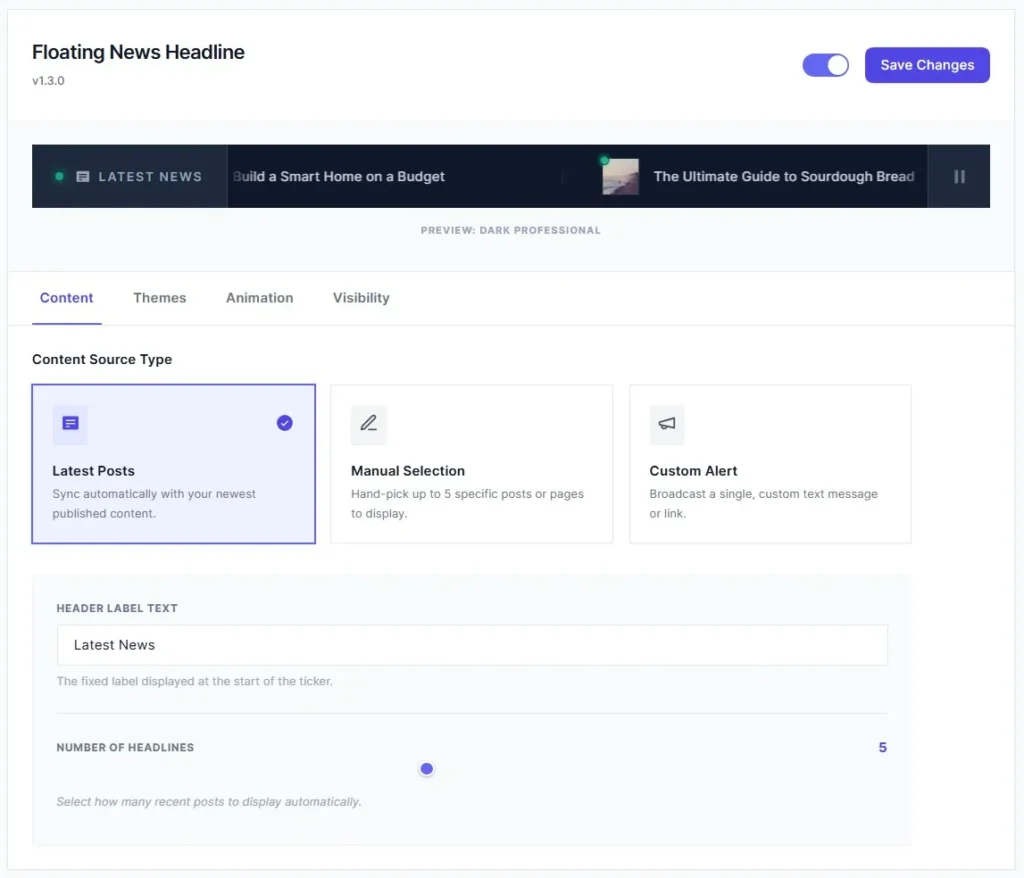
There is also a global on/off toggle at the top-right corner, so you can enable or disable the entire ticker with a single click, no need to deactivate the plugin itself.
2. Three Premium Themes Included for Free
Most ticker plugins give you one generic look and call it a day. Floating News Headline ships with three professionally designed themes, all included for free:
Theme 1: Corporate Classic
A clean, professional Indigo-themed design with a solid background, post thumbnails, author metadata display, and a document icon label. This theme is perfect for business websites, corporate blogs, and professional news portals that want a serious, trustworthy look.

Theme 2: Dark Professional
A sleek, high-contrast Slate design with an emerald status pulse indicator, gradient blur overlays on the edges, and pipe dividers between headlines. This theme is ideal for technology blogs, gaming websites, entertainment portals, and any site that wants a modern dark-mode aesthetic.

Theme 3: Emerald Floating Pill
A modern, bubble-style design with a mint-green palette, glassmorphism blur effects, and a distinctive rounded label button. The main bar is flat while keeping the label pill-shaped for a unique visual identity. This theme works beautifully for creative portfolios, startup landing pages, and lifestyle blogs.

Every single theme uses the BEM CSS architecture with the fnh- prefix. This means the ticker styles will never collide with your theme’s CSS — a problem that plagues many other ticker plugins.
3. Multi-Source Content — Three Ways to Feed Your Ticker
The Content tab gives you three distinct options for what content your ticker displays:
Latest Posts (Default)
The ticker automatically syncs with your newest published blog posts. You can control how many posts to display using a range slider (1 to 10 posts in the free version). Headlines refresh automatically based on the Transient caching cycle (every 10 minutes), so your ticker always shows the most recent content without any manual intervention.
Manual Selection
Want full editorial control? Switch to Manual Selection mode and use the built-in Post Picker, a beautiful search interface where you can type a keyword, see matching posts in real-time, and select up to 5 specific posts to display. The selected posts appear in a styled list where you can remove any of them with one click.
Custom Alert
Need to broadcast a specific message? The Custom Alert source lets you type any text message along with an optional target URL. This is perfect for urgent announcements like “Site maintenance scheduled for midnight” or “Black Friday Sale — 50% off all products” with a direct link to your sale page.
4. Customizable Label Text
The label is the fixed text that appears at the beginning of the ticker bar — like “Breaking News”, “Latest Headlines”, “Trending”, or anything you want. You can change this label to any text you prefer directly from the Content tab. This label persists on screen while the headlines scroll behind it, creating a professional broadcast-style look.
5. Animation Controls — Speed and Spacing
The Animation tab gives you precise control over two critical aspects of the ticker behavior:
Scroll Speed
Use the range slider to control how fast the headlines scroll across the screen. The range goes from 5 seconds (very fast, news-channel style) to 100 seconds (slow, relaxed scrolling). The default is 35 seconds, which is a balanced, comfortable reading speed. You can also type the exact number for pixel-perfect precision.
Headline Gap (Item Spacing)
Control the visual gap between each headline item as they scroll. The spacing range goes from 20px (tight, dense layout) to 300px (wide, spacious layout). The default is 80px. This setting helps you achieve the exact visual density you want — whether you prefer headlines close together for a fast-paced news feel or spaced apart for a cleaner look.
Pause on Mouse Hover
Toggle this option to make the ticker pause automatically when a visitor hovers their mouse over it. This is a key usability feature — it lets users easily read and click on a headline they are interested in without racing to catch it before it scrolls away.
6. Visibility and Page Targeting
The Visibility tab is where you control where and how the ticker appears:
Display Target Pages
Choose between showing the ticker on your Entire Website (every page and post) or only on your Home Page (front page and blog index). This granular control means you do not have to show the ticker everywhere if it does not make sense for your inner pages.
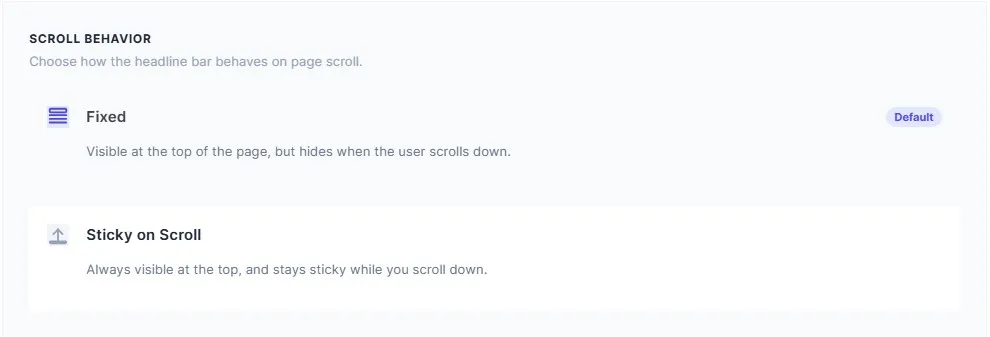
Scroll Behavior
This is one of the most thoughtful features. You get two scroll behavior modes:
- Fixed (Default) — The ticker is visible at the top of the page when it first loads, but gracefully hides when the user scrolls down. This gives a clean, unobtrusive experience — visitors see the headlines immediately, but they do not get in the way during deeper reading.
- Sticky on Scroll — The ticker stays permanently visible at the very top of the screen as a sticky bar, even while the user scrolls through the page. This is ideal for breaking news or urgent announcements that need maximum visibility at all times.
7. Placement Options — Automatic or Manual
You get two ways to place the WordPress news ticker plugin on your site:
Sticky Top (Default)
The ticker automatically injects itself at the very top of your website using the wp_body_open hook. No shortcodes needed, no widget areas to configure. Just activate the plugin, and it appears immediately. This is the recommended option for most users.
Shortcode Placement
For more control, you can place the ticker anywhere on your site using the shortcode [fnh_ticker] or [floating_news_headline_ticker]. Drop it into any page, post, sidebar widget, or even a page builder column. This is ideal if you want the ticker in a specific section rather than site-wide at the top.

8. Play and Pause Button
Every ticker theme includes a built-in Play/Pause toggle button on the right side of the bar. Visitors can click it to pause the scrolling animation and click again to resume it. The button uses proper aria-label attributes for screen reader accessibility, and the icon switches between a pause icon and a play icon based on the current state.
9. Seamless Infinite Loop Technology
One of the most annoying issues with ticker plugins is the “gap” you see when headlines reach the end and restart. Floating News Headline solves this completely with a duplicated group technique. The plugin renders two identical groups of headlines side by side and uses a continuous CSS animation. The result? A perfectly seamless, infinite scrolling loop with no visible gaps, no stuttering, and no jarring restart.
If your total headline text is too short for a seamless loop (less than 150 characters), the plugin automatically multiplies the items to ensure the visual continuity is never broken. This “short content protection” is all handled behind the scenes — you never have to worry about it.
10. Intelligent Caching for Performance
Every time the ticker fetches posts from the database, the results are cached using the WordPress Transient API for 10 minutes. This means the ticker does not hit your database on every single page load. The cache uses a versioned key strategy — when you save new settings, the cache version is incremented, which automatically invalidates old cached data without needing any raw SQL queries. This is a clean, WordPress-native approach to performance optimization.
11. Automatic Settings Migration
If you were using an older version of the plugin (which stored settings under the fnh_settings option key), the plugin automatically detects and migrates your settings to the new floating_news_headline_settings key during the upgrade. You will not lose any of your configuration when updating to the latest version.
12. Developer-Friendly Architecture
For developers who want to extend the plugin’s behavior, there is a filter hook available:
floating_news_headline_items — This filter lets you programmatically modify the array of ticker items (headlines) before they are rendered on the frontend. You receive both the $items array and the $settings array. Use this to inject custom items, remove certain posts, reorder headlines, or integrate with external data sources.
The entire codebase is namespaced under FloatingNewsHeadline, uses PSR-4 style autoloading, and follows WordPress coding standards. The PHP architecture consists of clean, single-responsibility classes: Activator, Adapter, Admin, Assets, Deactivator, Frontend, REST_API, and Settings.
Step-by-Step Setup Guide — How to Use the Floating News Headline Plugin
Getting started with this WordPress news ticker plugin takes less than two minutes. Here is how:

Step 1: Install the Plugin
Go to Plugins → Add New in your WordPress admin panel. Search for “Floating News Headline”. Click Install Now, then click Activate.
Step 2: Open the Dashboard
After activation, navigate to News Headlines in your admin sidebar. The React-powered dashboard will load with a live preview at the top and tabbed settings below.
Step 3: Choose Your Theme
Click the Themes tab and select one of the three available designs — Corporate Classic, Dark Professional, or Emerald Floating Pill. The live preview updates instantly, so you can see how each theme looks before saving.
Step 4: Configure Your Content Source
Click the Content tab. Choose between Latest Posts, Manual Selection, or Custom Alert. If you choose Latest Posts, adjust the number of headlines using the slider. If you choose Manual Selection, search and pick your posts. If you choose Custom Alert, type your message and optional link URL.
Step 5: Customize the Label
Still in the Content tab, change the Header Label Text to whatever you want — “Breaking News”, “Latest Updates”, “Headlines”, etc.
Step 6: Adjust the Animation
Click the Animation tab. Set your preferred scroll speed and headline spacing. Toggle the Pause on Hover option if you want the ticker to pause when visitors hover over it.
Step 7: Set Visibility
Click the Visibility tab. Choose whether to show the ticker site-wide or only on the homepage. Select your preferred scroll behavior — Fixed or Sticky on Scroll.
Step 8: Save and Go Live
Click the Save Settings button. Your ticker is now live on the frontend of your website. Visit your site to see it in action.
Floating News Headline vs. Other WordPress News Ticker Plugins
Let us be honest — there are several other WordPress news ticker plugin options available. But how does Floating News Headline stack up against the competition? Here is a transparent comparison:
| Feature | Floating News Headline | T4B News Ticker | Jestar News Ticker | Ditty |
|---|---|---|---|---|
| jQuery Dependency | ❌ None (Vanilla JS) | ✅ Requires jQuery | ✅ Requires jQuery | ✅ Requires jQuery |
| Animation Method | GPU-accelerated CSS | JavaScript-based | JavaScript-based | JavaScript-based |
| Frontend Footprint | Under 40KB | 80KB+ | 100KB+ | 150KB+ |
| Admin Dashboard | Modern React UI | Basic WordPress Settings | Standard HTML Form | Custom Post Type based |
| Live Preview | ✅ Instant | ❌ No | ❌ No | ❌ No (requires page refresh) |
| Free Themes | 3 Premium Themes | 3 Basic Styles | 1 Theme | 1 Theme (more in Pro) |
| CSS Architecture | BEM (zero conflicts) | Standard CSS | Standard CSS | Standard CSS |
| Caching | WordPress Transients | None | None | Plugin-level cache |
| Custom Alert | ✅ With link support | ❌ No | ❌ No | ✅ Yes |
| Scroll Behavior | Fixed + Sticky modes | Fixed only | Fixed only | Fixed only |
| Seamless Loop | ✅ With auto-protection | Partial | Gap visible | ✅ Yes |
| Security | Full sanitization + REST nonce | Basic | Basic | Good |
The difference is clear. Most alternative plugins still rely on jQuery for animations, use basic JavaScript-driven motion (which is not GPU-accelerated), and do not offer any kind of intelligent caching or BEM-based CSS isolation. Floating News Headline was architecturally designed from day one to avoid every one of these common pitfalls.
Why Floating News Headline Is Better Than the Rest
Let us break down the key advantages that make this WordPress news ticker plugin genuinely stand out:
1. Zero jQuery — True Lightweight Performance
jQuery is a 90KB library that many themes and plugins already load. But if your ticker plugin adds another jQuery dependency just to animate some scrolling text, that is wasteful. Floating News Headline uses pure vanilla JavaScript — no library dependencies at all. The result is a faster page load and fewer HTTP requests.
2. GPU-Accelerated Animations That Never Stutter
The scrolling animation uses CSS transform: translateX() — a property that is processed by your device’s GPU rather than the CPU. This means the ticker runs at a smooth 60 frames per second, even on mobile devices. Compare this to JavaScript-driven setInterval or requestAnimationFrame animations that can cause jank and stutter on slower devices.
3. A Dashboard That Actually Looks Good
Most WordPress plugin settings pages look like they were built in 2012. Floating News Headline’s React-powered admin dashboard is a breath of fresh air — tabbed navigation, elegant card-based UI, live preview that updates in real time, and smooth animations throughout. It is the kind of admin interface you would expect from a premium SaaS product, not a free WordPress plugin.
4. BEM CSS — No More Theme Conflicts
If you have ever installed a ticker plugin and found that your theme’s CSS was breaking the ticker’s appearance (or worse, the ticker was breaking your theme), you know how frustrating CSS conflicts can be. Floating News Headline uses the BEM naming convention with the fnh- prefix for every single CSS class. This creates a completely isolated namespace that will never interfere with your theme’s styles.
5. Bulletproof Security
Security is not an afterthought — it is built into the architecture. Every REST API route requires the manage_options capability. Every input is sanitized using WordPress-native functions like sanitize_text_field(), intval(), and esc_url_raw(). Every output is escaped using esc_html(), esc_attr(), and esc_url(). Nonce verification is enforced on every single API call via the X-WP-Nonce header.
6. It Is Completely Free
Three premium themes, multi-source content, live admin preview, GPU animations, BEM architecture, intelligent caching, custom alerts, manual post picker, scroll behavior options, responsive design, and developer hooks, all of this for free. No hidden paywalls for basic features. No nag screens begging you to upgrade. The free version is genuinely powerful enough for most WordPress sites.
Who Should Use This Plugin?
Floating News Headline is perfect for:
- News websites that want a fast, professional headline ticker at the top of their site
- Business and corporate sites that need to display company updates and announcements
- Bloggers and content creators who want to promote their latest or best articles
- E-commerce stores looking to highlight sales, new products, and promotional messages
- Educational institutions broadcast important notices and deadlines
- Developers who want a clean, extensible, hook-friendly WordPress news ticker plugin
- Any WordPress site owner who values performance, design, and security
What About the Pro Version?
While the free version is already packed with features, there is a Pro version planned that will take things even further:
- 10+ Exclusive Templates — Additional premium designs beyond the three included free themes
- Unlimited Manual Post Selection — Remove the 5-post limit for hand-picked headlines
- RSS Feed Integration — Pull headlines from any external RSS feed URL
- WooCommerce Support — Display on-sale, featured, or latest products directly in the ticker
- Google Fonts Integration — Choose from hundreds of typography options
- Custom CSS Code Box — Advanced styling control for pixel-perfect customization
- Granular Page Targeting — Show or hide the ticker on specific categories, posts, or pages
- Multi-Ticker Support — Create and manage multiple independent tickers
- Date and Time Scheduling — Schedule tickers to appear and disappear at specific times
- Priority Support — 24/7 developer support for Pro users
But let us repeat that the free version is incredibly capable on its own. You do not need the Pro version unless you have very specific advanced needs.
Frequently Asked Questions
Will this plugin slow down my website?
No. The total frontend footprint is under 40KB. It uses vanilla JavaScript (no jQuery), GPU-accelerated CSS animations, and WordPress Transient caching. It is one of the lightest WordPress news ticker plugin options available.
Does it work with my theme?
Yes. The BEM CSS architecture with the fnh- prefix ensures zero style conflicts with any WordPress theme. The ticker injects via the standard wp_body_open hook or shortcode.
Can I show different headlines on different pages?
In the free version, you can show the ticker site-wide or on the homepage only. Granular page-level targeting will be available in the Pro version.
Is the plugin translation-ready?
Yes. The plugin uses the floating-news-headline text domain and all strings are wrapped in proper WordPress internationalization functions. You can translate it with Loco Translate or any .po/.mo editor.
Can I use it with Elementor, Divi, or other page builders?
Absolutely. Use the shortcode [fnh_ticker] inside any page builder text module or shortcode block. Or use the default Sticky Top placement, which works with every theme and builder automatically.
Final Verdict — Should You Install a Floating News Headline?
If you are looking for a WordPress news ticker plugin that is genuinely modern, ridiculously lightweight, beautifully designed, and packed with features without charging you a single dollar, then Floating News Headline is the plugin you have been searching for.
It is not just a small improvement over existing solutions. It is a complete architectural rethink of what a news ticker plugin should be in 2026. React admin dashboard. GPU-accelerated animations. BEM CSS isolation. WordPress Transient caching. Vanilla JavaScript. Three premium themes. Multiple content sources. Scroll behavior options. Developer hooks. Enterprise-grade security. All free.
Stop settling for outdated, jQuery-dependent, poorly designed ticker plugins that slow down your site and clash with your theme. Upgrade to Floating News Headline today and give your visitors the polished, professional experience they deserve.
Ready to get started? Install Floating News Headline directly from your WordPress dashboard by going to Plugins → Add New and searching for “Floating News Headline”. It takes less than 60 seconds to set up.
