

If you run a website in 2026, you already know the headache that comes with legal compliance. Between GDPR, CCPA, LGPD, and what feels like a dozen other acronyms, keeping your site legally sound can be overwhelming. I spent weeks researching solutions before stumbling upon WP Legal Pages, and after using it on my own website, I can confidently say it’s one of the most straightforward compliance tools I’ve come across.
Table of Contents
In this review, I’ll walk you through my experience with the WPLP Compliance Platform, covering everything from installation to actually creating legal pages. Whether you’re a blogger, run an e-commerce store, or manage multiple client sites, this honest breakdown should help you decide if it’s the right fit.
What Exactly is WP Legal Pages?
WP Legal Pages is a WordPress plugin designed to help website owners generate professional legal pages quickly. We’re talking about Privacy Policies, Terms and Conditions, Cookie Policies, DMCA notices, and more – all the documents that lawyers charge hundreds of dollars to draft.
The plugin is part of what the developers call the “WPLP Compliance Platform,” which also includes WP Cookie Consent for managing cookie banners and consent. Together, they create a pretty comprehensive compliance solution that covers most of what the average website needs.
What caught my attention initially was the trust factor. The plugin has over 10,000 active installations on WordPress.org and maintains a 4.8-star rating from 91 reviews. That’s not easy to achieve in a competitive space like WordPress plugins. The development team at WP Legal Pages has apparently been in the WordPress ecosystem for over 15 years, which explains the polish I noticed throughout my experience.
Pricing: What Do You Actually Get?
Before diving into features, let’s address the elephant in the room – cost. WP Legal Pages operates on a freemium model, which worked perfectly for my evaluation.
Free Version
The free tier isn’t just a teaser. You get four essential templates: Privacy Policy, Terms and Conditions, CCPA Privacy Notice, and DMCA Policy. For a personal blog or small website, this covers the basics. You’re limited to one website and 100 pages for cookie scanning, but honestly, that’s enough for many users.
Professional Tier ($5/month billed annually or $10/month)
This is where things get interesting. If you opt for annual billing, you’re looking at just $60 per year for up to 3 websites. You unlock 30+ legal templates, 50 monthly scans, 10,000 pages per scan, and 100,000 pageviews per month. Features include Force Agreement, One-click Affiliate Disclosure, Age Verification Popup, Google Consent Mode v2, Geo-targeting, and IAB TCF 2.2 Support.
Business Tier ($7.5/month billed annually or $15/month)
The most popular option, and I can see why. For $90 per year (with annual billing), you get support for up to 10 websites with unlimited scans per month, 20,000 pages per scan, and unlimited pageviews. All Professional features are included, plus the enhanced limits make this perfect for growing businesses or freelancers managing client sites.
Agency Tier ($17.5/month billed annually or $35/month)
For agencies managing client sites, this tier supports 25 sites with all Business tier features. At $210 per year with annual billing, it’s designed for serious professionals managing multiple client portfolios.
I’ll be honest – compared to other compliance solutions that charge per site or have hidden fees, this pricing structure is refreshingly transparent. The annual billing discount of 50% makes a real difference, and the Professional tier especially feels like a no-brainer for anyone running a business website.
My Experience: Installation and First Impressions
Installing WP Legal Pages was standard WordPress fare. I grabbed the free version from the WordPress.org repository, activated it, and was immediately greeted by the plugin dashboard.
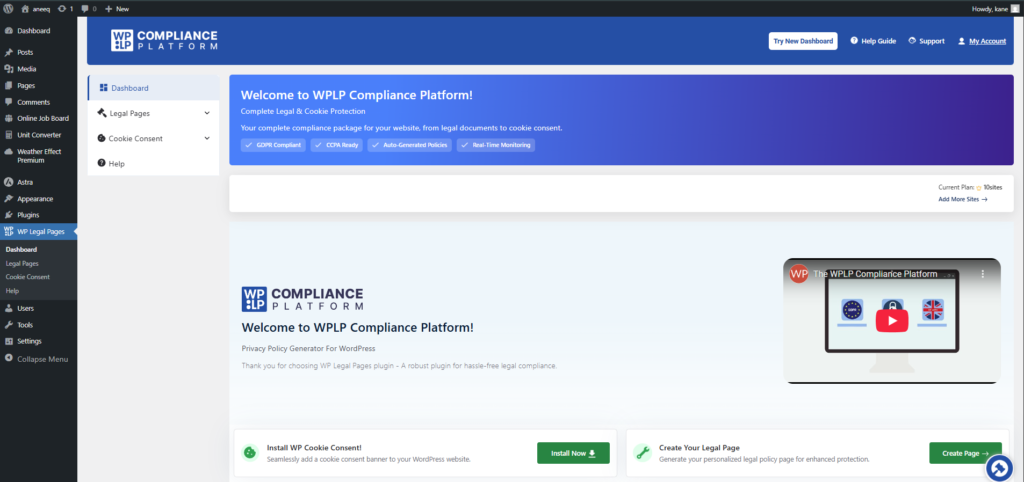
The first thing I noticed was that WP Legal Pages works alongside WP Cookie Consent – they’re designed as a bundle. If you’re already using another cookie consent solution, you might feel a bit conflicted, but the integration between the two is seamless. The dashboard made it clear there are two components working together: legal page generation and cookie consent management.
I did hit a minor snag when trying to connect my account. The onboarding could be clearer about whether to download from WordPress.org first or start from their website. It’s not a dealbreaker, but a bit of streamlining here would help new users.
Once I got past the initial setup, the main dashboard was refreshingly clean. Everything is organized logically, and I didn’t feel like I needed to read documentation to figure out where things were. The sidebar navigation breaks things down into manageable sections: Legal Pages, Cookie Consent, Settings, and so on.
Creating Legal Pages: The Wizard Experience
Here’s where WP Legal Pages really shines. Creating my first privacy policy took about five minutes – and I’m not exaggerating.
The process starts with clicking “Create Page” from the dashboard, which launches a step-by-step wizard. The wizard walks you through four clear stages:
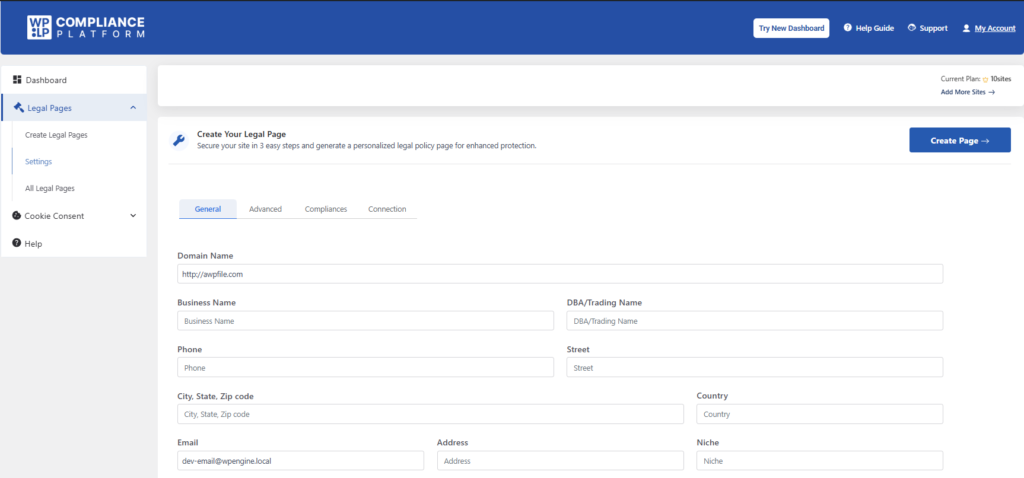
- Choose a Template: You select what type of legal page you need. The free version shows you the premium templates too (grayed out), which is a nice way to see what you’d unlock by upgrading.
- Enter Business Information: This is where you add your website name, company details, contact information, and any specifics about how you handle data. The wizard asks targeted questions rather than dumping a form on you.
- Configure Sections: Depending on the template, you can toggle specific sections on or off. Running an e-commerce store? Include the sections about payment processing. Just a blog? Skip them.
- Generate and Publish: The plugin creates your page, and you can publish it immediately or save it as a draft for review.
What I appreciated most was the “smart tag” system. Once you enter your business information, it automatically populates across all your legal pages. Change your contact email? Update it once, and every policy reflects the change. This alone saves significant time if you’re managing multiple legal documents.
The generated policies don’t read like robotic templates either. They’re written in clear, professional language that’s actually understandable to regular visitors. I’ve seen legal page generators spit out dense legalese that nobody would ever read – WP Legal Pages avoids that trap.
Key Features That Impressed Me
Beyond basic page generation, several features stood out during my testing:
Integration with WP Cookie Consent
If you’re serious about compliance, managing cookies is just as important as having a privacy policy. The WPLP Compliance Platform handles both through tight integration. Your cookie policy automatically aligns with your consent banner settings, preventing the inconsistencies that can trip you up during audits.
Geo-Targeting Capabilities
This feature is genuinely clever. The plugin can display different compliance notices based on where your visitors are located. European visitor? Show GDPR-specific notices. California resident? Trigger CCPA requirements. This level of granularity usually requires expensive enterprise solutions.
Google Consent Mode v2 Support
With Google cracking down on consent requirements for analytics and advertising, having native support for Consent Mode v2 is huge. I didn’t have to install additional plugins or write custom code – it just worked.
Form Plugin Integrations
If you use WPForms, Contact Form 7, or Gravity Forms, WP Legal Pages can tie your legal policies directly into form submissions. Users can be prompted to accept your terms before submitting, with proper logging of their consent.
Announcement Banners
When you update your privacy policy (which happens more often than you’d think), you can display a notification banner alerting returning visitors. This demonstrates good faith and helps with compliance requirements around policy changes.
Who Should Use WP Legal Pages?
After spending considerable time with the plugin, I can identify a few groups who would benefit most:
Bloggers and Content Creators
If you monetize through ads or affiliate links, you need proper disclosures. The affiliate disclosure templates (including Amazon-specific versions) are compliance-ready out of the box. The free tier covers most bloggers adequately.
E-commerce Store Owners
WooCommerce integration means your checkout process, refund policies, and data handling are all covered. The Pro templates for digital goods refunds and return policies are particularly useful.
Freelancers and Agencies
Managing compliance across client sites is a nightmare. The multi-site support in higher tiers makes it manageable, and you can standardize your compliance approach across your entire client portfolio.
Anyone Without Legal Expertise
Let’s be real – most of us aren’t lawyers. WP Legal Pages bridges the gap between “I need legal pages” and “I can’t afford a lawyer for every website I launch.”
Pros and Cons: The Honest Assessment
What I Liked
– Genuinely easy to use, even for non-technical users
– Pricing is extremely competitive for what you get
– Templates are well-written and regularly updated
– Integration between legal pages and cookie consent is seamless
– Works with essentially every WordPress theme
What Could Be Better
– Initial setup documentation could be clearer
– Some users report occasional issues with major updates (though support seems responsive)
– The free version is limited to basic templates – serious compliance requires Pro
– Cookie consent features require the bundled plugin, which might conflict if you’re already using an alternative
Final Verdict
After using WP Legal Pages for several weeks, I’m genuinely impressed. It takes a genuinely complicated problem – legal compliance – and makes it approachable for regular website owners. The wizard-based approach means you don’t need to understand privacy law to generate compliant documents, and the pricing makes it accessible for sites of almost any size.
Is it perfect? No. The documentation could use work, and the relationship between the free WordPress.org plugin and the premium platform isn’t immediately obvious. But these are minor friction points in an otherwise polished experience.
If you’re currently cobbling together legal pages from random online generators or – worse – running a site without them, WP Legal Pages deserves a serious look. Start with the free version to test the waters, but I suspect most users will find the Professional tier worth the investment.
My Rating: 4.5 out of 5 stars
The plugin delivers exactly what it promises: professional legal compliance without the professional price tag. For the peace of mind it provides, that’s a trade I’m happy to make.
