
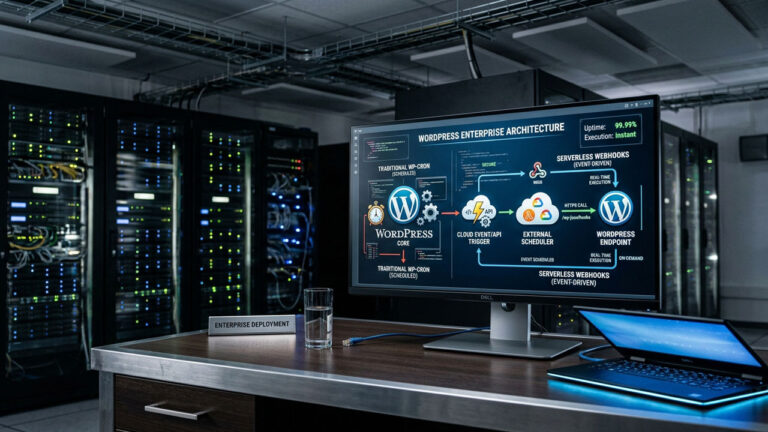
As WordPress scales from a simple CMS to an enterprise-grade application, architectural bottlenecks that were once invisible suddenly become critical failure points. One of the most notorious scaling problems hiding in plain sight is WordPress’s native background processing system. For high-traffic, high-revenue environments—especially those running complex WooCommerce operations—relying on default scheduled tasks is a recipe for performance degradation.
Replacing WP-Cron with serverless webhooks is rapidly becoming the standard for enterprise WordPress architecture. By offloading background processing to robust, independent infrastructure, development teams can reclaim critical server resources. This architectural shift frees up valuable PHP workers previously tied up by scheduled tasks, ensuring they are dedicated solely to rendering pages. Furthermore, externalizing the cron guarantees precise execution timing for mission-critical operations—such as processing complex WooCommerce subscription renewals—while ensuring a consistently fast, seamless front-end experience for your end-users.
In this comprehensive guide, we will examine the limitations of the default system, explore the shift toward serverless architectures, and detail how to transition to modern, API-driven scheduling.
The Architectural Flaw of Default WP-Cron
Before implementing a solution, it is vital to understand the problem. WordPress does not possess a true, continuous background scheduler. Instead, it utilizes a “pseudo-cron” system—WP-Cron.
The “Check-on-Request” Bottleneck
WP-Cron is an event-driven system tied directly to user traffic. Every time a visitor or search engine bot loads a page on your site, WordPress checks the wp_options table to see if any scheduled tasks (like publishing a post, sending an email, or processing a WooCommerce subscription renewal) are due.
If a task is due, WordPress spawns a non-blocking internal HTTP request to wp-cron.php. While this ensures WordPress works universally across cheap shared hosting environments, it creates severe issues at an enterprise scale:
- Resource Spikes Under Heavy Load: On a high-traffic WooCommerce store, thousands of concurrent visitors can trigger thousands of redundant database checks. This consumes valuable PHP-FPM workers that should be dedicated to rendering pages and processing checkouts. The immediate consequence of worker saturation is a spike in your Time to First Byte (TTFB), resulting in noticeably slower page loads for customers and potential 502 Bad Gateway errors during traffic surges.
- The Reliability Gap: Conversely, if your site experiences a lull in traffic (or if robust page caching prevents PHP execution entirely), scheduled tasks simply will not run. This leads to the infamous “Missed Schedule” errors for posts and delayed transactional emails. When traffic eventually returns, WP-Cron attempts to process the massive backlog all at once, further crippling the server.
- Race Conditions: When massive tasks, like complex database backups, bulk product syncs, or pushing data via enterprise APIs, are triggered by user requests, it can lead to race conditions where multiple processes attempt to run the same heavy workload simultaneously, crashing the server.
For enterprise WordPress, WP-Cron is not just inefficient; it is a liability.
The Traditional Fix: System-Level Cron Jobs
For years, the standard developer advice has been to disable the default behavior by adding define('DISABLE_WP_CRON', true); to the wp-config.php file.
This critical line of code prevents WordPress from automatically firing the wp-cron.php script on every single page view. It is important to note that disabling WP-Cron does not stop plugins from scheduling events; it merely stops the “check-on-request” mechanism. Events will still be added to the database queue, patiently waiting for an external trigger to tell WordPress to process them. This single configuration change instantly reduces CPU load by freeing up PHP workers, stopping redundant database queries during traffic spikes, and preventing visitor requests from initiating massive background processes. Without a constant stream of background tasks fighting for server resources, your TTFB improves dramatically.
The task execution is then handed over to the server’s operating system via a system cron job (e.g., using crontab on Linux) that pings wp-cron.php at regular intervals, typically every 5 minutes.
While this solves the dependency on user traffic and stops the check-on-request cycle, it still runs the heavy lifting on the same server that hosts your application. As enterprise tech stacks evolve, coupling your application server with your task scheduling server is increasingly viewed as an anti-pattern.
The Enterprise Standard: Serverless Webhooks
The modern approach to background processing in composable commerce and headless architectures is entirely decoupled. Replacing WP-Cron with serverless webhooks involves moving the scheduling engine off your origin server entirely.
Instead of a local Linux cron job pinging your site, an external, highly available serverless function or managed scheduling service triggers a specific webhook endpoint on your WordPress application.
Why Serverless Makes Sense for WordPress
- Guaranteed Precision: Dedicated webhook schedulers (like HookPulse, AWS EventBridge, or custom Cloudflare Workers) offer millisecond precision. If a WooCommerce renewal must process exactly at midnight UTC, serverless infrastructure guarantees it, unaffected by your web server’s current load.
- Zero Infrastructure Management: Serverless means you don’t configure, patch, or monitor the underlying scheduling servers. You define the payload and the timing, and the platform handles the delivery.
- Built-in Retry Logic and Observability: A major failing of system cron is observability; if a task fails, finding the logs is tedious. Modern webhook schedulers provide dashboards, detailed delivery logs, and automatic retry logic with exponential backoff if your WordPress endpoint returns a 5xx error.
- True Decoupling: By moving the “clock” outside of your WordPress stack, you free up your primary servers to focus 100% on application logic and delivering the front end.
How to Implement Serverless Scheduling
Transitioning an enterprise WordPress site to serverless webhooks requires a deliberate architectural shift.
1. Disable Default Execution
The first step remains the same. You must stop WordPress from checking for tasks on page load.
// Add to wp-config.php
define( 'DISABLE_WP_CRON', true );
2. Choose Your Serverless Infrastructure
You have several paths for implementing the external scheduler:
- Cloudflare Workers with Cron Triggers: If your enterprise site utilizes Cloudflare, you can deploy a lightweight Worker script. Using Cloudflare’s Cron Triggers, you can schedule the Worker to fetch your
wp-cron.phpendpoint at precise intervals. This is highly performant as the trigger originates from the edge. - AWS EventBridge Scheduler: For teams already in the AWS ecosystem, EventBridge Scheduler provides a highly scalable way to trigger HTTP endpoints (webhooks) on a granular schedule, complete with robust retry policies and integration with CloudWatch for logging.
- Dedicated Webhook Services: Tools explicitly built for API workflows, such as HookPulse or Webhook Scheduler, are increasingly popular. They offer visual dashboards and are designed specifically for managing delayed HTTP jobs and API callbacks without requiring custom cloud engineering.
3. Target Specific Endpoints (Moving Beyond wp-cron.php)
While you can simply have a serverless function ping https://yourdomain.com/wp-cron.php?doing_wp_cron, the true power of serverless webhooks is targeting specific actions.
For highly customized enterprise WooCommerce builds, developers often bypass the standard WP-Cron queue entirely for critical tasks. Instead, they create secure, custom REST API endpoints in WordPress.
The serverless scheduler then sends a webhook payload directly to that specific endpoint (e.g., https://yourdomain.com/wp-json/custom/v1/sync-inventory) with secure API keys. This isolates critical tasks from the general WordPress maintenance queue, allowing for precise monitoring and failure recovery.
If you are heavily utilizing WooCommerce, ensure your setup accounts for the Action Scheduler (the robust queuing system Woo uses). Action Scheduler still relies on the base cron system to trigger its batches. If you disable WP-Cron without configuring a reliable external trigger, actions will pile up as “past due” in the database, potentially crippling your store when the backlog is eventually processed. Therefore, your external serverless webhook must run frequently enough (usually every 1 minute for high-volume stores) to keep the Action Scheduler queue draining smoothly and prevent massive database log jams.
Conclusion
Replacing WP-Cron with serverless webhooks is a defining characteristic of a mature, enterprise WordPress architecture. By decoupling your task scheduling from your application server, you eliminate a significant performance bottleneck, guarantee task execution, and gain invaluable observability. For high-traffic WooCommerce stores and complex digital platforms, this optimization is no longer optional—it is a foundational requirement for scalability. For more insights on building robust digital experiences, explore our comprehensive resources on web architecture (Note: Replace with actual provided internal link when available). To understand the broader context of building modern, scalable APIs, we recommend reviewing Cloudflare’s guide to serverless architectures.
Frequently Asked Questions (FAQ)
Does disabling WP-Cron break my plugins? No. Disabling WP-Cron in your wp-config.php file merely stops WordPress from triggering the queue on page loads. As long as you have an external system (like a serverless webhook or system cron) pinging the queue, your plugins will function normally and often more reliably.
Is replacing WP-Cron with serverless webhooks necessary for small sites? Generally, no. Small, low-traffic brochure websites function perfectly fine with the default WP-Cron or a basic server-level cron job. Serverless webhooks are designed to solve the complex scaling, reliability, and observability challenges faced by enterprise WordPress and high-volume WooCommerce applications.
How often should my serverless webhook trigger the WordPress queue? For most enterprise applications, triggering the queue every 1 to 5 minutes is standard. High-velocity WooCommerce stores processing thousands of orders often require a 1-minute interval to ensure the Action Scheduler processes transactional emails and inventory syncs without noticeable delay.
Can I use AWS Lambda to replace WP-Cron? Yes, you can write an AWS Lambda function to act as the HTTP client that triggers your WordPress endpoints. However, modern services like AWS EventBridge Scheduler or Cloudflare Cron Triggers are generally easier to configure for pure time-based webhook delivery, as they don’t require you to write and maintain the underlying compute function just to make an HTTP request.
