
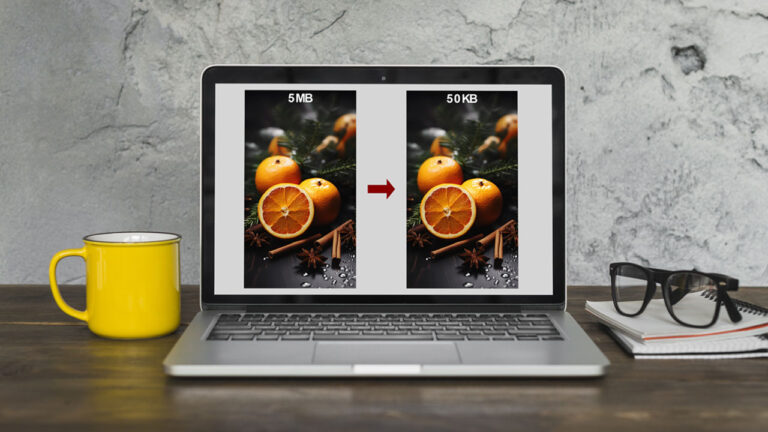
Whether you’re running a WordPress blog, managing an eCommerce store, or building a portfolio site, image optimization remains one of the most impactful improvements you can make to your website’s performance. Compressing images reduces file sizes without sacrificing quality, which directly improves page load times, Core Web Vitals scores, and ultimately your SEO rankings.
After testing every major tool on the market in 2026, I’ve curated this definitive list of the 20 best image compression and resizing tools available today.
Table of Contents
This blog highlights 20 top image compressor and resizer tools designed for different needs, from beginners seeking simple solutions to professionals needing more control. These tools cover various formats and provide diverse features, including batch processing, format conversion, and customizable settings. Whether you’re optimizing images for the web, social media, or personal use, these tools ensure faster load times, better user engagement, and smoother website performance.
1. TinyPNG:

TinyPNG remains the gold standard for PNG and JPEG compression. Its smart lossy compression algorithm reduces file sizes by up to 80% while preserving visual quality that works for both casual blogs and professional photography sites.
The WordPress plugin integration is seamless, and their API handles bulk processing efficiently. I’ve used TinyPNG on hundreds of client sites—the results consistently outperform competing tools in both compression ratio and visual fidelity.
Best for: WordPress users, bulk processing, API integration
2. ImageOptim:

macOS users get the best overall experience with ImageOptim. This open-source tool applies multiple optimization algorithms in sequence, stripping metadata and compressing without any perceptible quality loss.
What sets ImageOptim apart is its privacy-first approach—all processing happens locally on your machine, making it ideal for sensitive client work where data can’t leave your computer.
Best for: Mac users, privacy-conscious projects, lossless compression
3. Compress JPEG:

TinyJPG is TinyPNG’s JPEG-focused sibling, using the same compression engine optimized specifically for photographs. If your site is image-heavy with product photos or photography portfolios, this delivers consistent results without the quality degradation seen in lesser tools.
Best for: Photographers, eCommerce sites, JPEG-heavy pages
4. JPEG-Optimizer:
This straightforward tool specializes in JPEG compression with both size reduction and dimension resizing. The compression level slider gives direct control over output quality, though the interface shows its age compared to modern alternatives.
For simple one-off compressions without account creation or upload limits, JPEG-Optimizer serves its purpose adequately.
Best for: Quick JPEG-only compressions, dimension resizing
5. Optimizilla:

Optimizilla’s batch processing handles up to 20 images simultaneously with adjustable compression sliders. The preview functionality shows real-time results, making it easy to find the sweet spot between file size and quality.
For sites with dozens of product images or blog post graphics, the batch processing alone justifies choosing Optimizilla.
Best for: Batch processing, visual preview, portfolio sites
6. Squoosh:

Google’s Squoosh has evolved into the most feature-complete browser-based tool available. The real-time comparison slider showing original versus compressed is invaluable for finding the optimal quality-to-size balance.
Squoosh supports WebP, AVIF, and JPEG XL—the cutting-edge formats that provide superior compression. For developers building modern sites, this is your go-to tool for format experimentation.
Best for: Web developers, format optimization, responsive images
7. Kraken.io:

Kraken.io is a powerful image optimization tool offering both free and paid plans. It supports JPEG, PNG, and GIF formats, allowing users to Image Compress either losslessly or using smart lossy techniques. Kraken.io is known for its fast processing speed and bulk image optimization, making it popular among eCommerce platforms and high-traffic websites. It also provides a robust API and WordPress plugin for seamless integration. Kraken.io ensures that optimized images retain high quality while reducing load times, helping websites improve their SEO and user experience.
8. ShortPixel:

ShortPixel offers three compression modes—lossy, glossy, and lossless—giving you precise control over the quality-versus-size tradeoff. The WordPress plugin handles images automatically upon upload, and the pricing structure is among the most competitive for high-volume sites.
What distinguishes ShortPixel is the glossy mode, which applies optimizations that actually enhance visual quality on certain image types.
Best for: WordPress automation, high-volume sites, multiple compression modes
9. Compressor.io:

Compressor.io offers both lossy and lossless compression with a straightforward drag-and-drop interface. The 50MB file size limit handles most individual images, though bulk operations require the paid tier.
The compression quality is competitive with TinyPNG for typical web use cases, though I’ve noticed slight artifacts on high-detail photographs compared to other tools.
Best for: Quick compressions, beginners, occasional use
10. ResizePixel:
Beyond compression, ResizePixel handles format conversion and dimension adjustments in a single workflow. The batch processing, format conversion to WebP, and no-signup policy make it practical for quick tasks.
For sites transitioning to WebP while maintaining JPEG fallbacks, the format conversion alone provides meaningful performance improvements.
Best for: Format conversion, dimension changes, quick edits
11. ILoveIMG:

ILoveIMG extends beyond compression into a full image toolkit—watermarking, cropping, and conversion alongside compression. The batch processing handles 40 images per operation, and the interface is intuitive for non-technical users.
Best for: Multiple image tasks, watermarking, bulk operations
12. ResizeImage.net:
A no-frills resizing and compression tool that gets the job done without complication. Supports the expected formats and provides basic dimension controls suitable for most common use cases.
Best for: Simple resizing tasks, basic compression
13. Caesium:

Windows users seeking locally-installed software get excellent results with Caesium. The batch processing handles hundreds of images, and the compression ratios consistently outperform online alternatives for local workflows.
Best for: Windows desktop users, large batch jobs, offline work
14. Online Image Resize:

This tool specializes in dimension resizing with preset options for social media platforms and common web sizes. Compression is secondary to the resizing functionality, but the combined workflow saves time.
Best for: Social media image preparation, dimension presets
15. TinyJPG:

RIOT provides granular control with real-time side-by-side comparison. For professionals who need precise control over compression parameters, this is one of the most capable free tools available.
Best for: Professionals, precise control, quality comparison
16. RIOT (Radical Image Optimization Tool):
RIOT is a lightweight Windows-based tool designed for advanced image optimization. It supports multiple formats like JPEG, PNG, and GIF, offering users complete control over compression settings. RIOT allows real-time comparisons between the original and optimized images, helping users achieve the perfect balance between file size and quality. The tool is ideal for photographers, designers, and web developers who need precise optimization control. Its batch-processing feature and customizable interface make it a powerful solution for handling large volumes of images efficiently.
17. EZGIF:

Primarily known for GIF optimization, EZGIF includes compression and resizing alongside its animation capabilities. For sites using animated content, this handles everything in one place.
Best for: GIF optimization, animated content, simple edits
18. PicResize:

A comprehensive online editor combining resizing, cropping, compression, and basic filters. The all-in-one approach suits users who need multiple image operations without switching between tools.
Best for: Multiple editing needs, basic adjustments
19. PunyPNG:

PunyPNG’s compression algorithm handles PNG, JPEG, and GIF with consistent results. The batch compression feature is particularly useful for site-wide optimization tasks.
Best for: Batch PNG compression, site-wide optimization
20. FreeConvert:
Beyond compression, FreeConvert handles format conversion between all major image formats. The 1GB file size limit accommodates high-resolution images, and the compression quality is competitive.
Best for: Format conversion, large files, multiple format support
Which Tool Should You Choose?
For most WordPress sites, TinyPNG or ShortPixel offer the best balance of quality, automation, and cost. For developers building custom solutions, Squoosh’s format support and Kraken.io’s API provide the flexibility needed for modern workflows.
The performance difference between top-tier tools is minimal for typical web use—what matters is integration with your existing workflow and whether batch processing fits your needs.
