
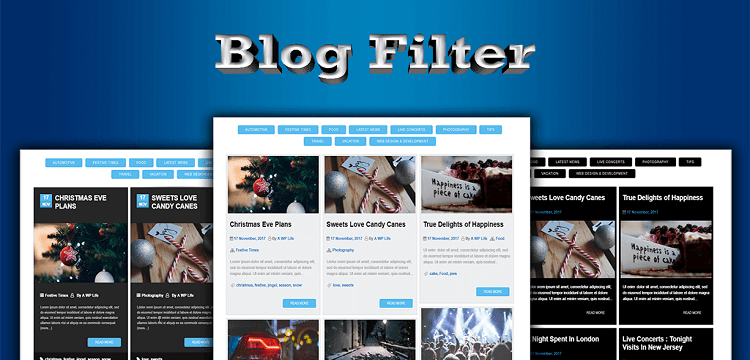
The blog filter plugin is used to categorize your blog posts easily on your site. Adding and configure blog filter plugin shortcode on your WordPress sites is explained by the developer below. Use the available settings to manage the shortcode, so you don’t need to regenerate the shortcode once.
Table of Contents
Default Shortcode
[AWL-BlogFilter post_type="post" blog_template="template1" blog_col_large_desktops="col-lg-4" blog_col_desktops="col-md-4" blog_col_tablets="col-sm-6" blog_col_phones="col-xs-12" blog_image="yes" blog_image_link="yes" blog_image_lightbox="yes" blog_image_hover_effect="hover1" blog_image_quality="medium" blog_title="yes" blog_title_link="yes" blog_title_font_size="25" blog_title_color="#000" blog_title_below_image="yes" blog_desc="yes" blog_desc_characters="100" blog_desc_font_size="14" blog_desc_color="#a4a6ac" blog_desc_box_color="#EDEEF0" three_dots="yes" link_open_new_tab="_blank" blog_read_more="yes" blog_read_more_text="Read More" blog_date="yes" blog_date_below_image="yes" blog_author="yes" blog_author_below_image="yes" blog_categories="yes" blog_tags="yes" blog_comments_count="yes" blog_order_by="date" blog_order="DESC" blog_filter_order_by="title" blog_filter_order="ASC" blog_thumb_hover="yes" blog_thumb_spac="5" blog_pagination="yes" blog_load_more="yes" blog_load_onscroll="yes" blog_pagination_LoadMore_color="#58BBEE" blog_per_page_and_init_load="12" blog_on_load_scroll="3" load_more_text="Load More" no_more_text="No More Posts" blog_filters_dropdown="yes" blog_filters="yes" blog_filter_style="button_filter" filter_post_count="yes" blog_filter_all="yes" blog_all_text="All" blog_multi_filter="yes" blog_multi_filter_logic="yes" blog_search="yes" blog_search_text="Search" blog_search_multi_word="yes" blog_buttons_color="#58BBEE" blog_filtering="category" selected_terms="2,5,8" exclude_terms="" default_filter_term="all" link_on_date="yes" link_on_author="yes" link_on_cat="yes" link_on_tag="yes" disable_bootstrap_css="no" disable_bootstrap_js="no" custom_css="" ]
You don’t have to generate shortcode, again and again; you can edit / update Blog Filter Shortcode directly on the page. You can see that there is every key has a value for every setting. We are showing you how to edit the shortcode without regenerating it.
Summary of All New Features NEW
| # | Feature | Shortcode Attribute |
|---|---|---|
| 1 | Custom Post Type Support | post_type |
| 2 | Fixed Grid Layout | blog_fixed_grid |
| 3 | Disable Bootstrap CSS | disable_bootstrap_css |
| 4 | Disable Bootstrap JS | disable_bootstrap_js |
| 5 | Link On Title | blog_title_link |
| 6 | Three Dots After Description | three_dots |
| 7 | Link Open In New Tab (All Links) | link_open_new_tab |
| 8 | Link On Date | link_on_date |
| 9 | Link On Author | link_on_author |
| 10 | Link On Categories | link_on_cat |
| 11 | Link On Tags | link_on_tag |
| 12 | Show Comments Count | blog_comments_count |
| 13 | Load More Button (AJAX) | blog_load_more |
| 14 | Infinite Scroll | blog_load_onscroll |
| 15 | Posts Per Page / Initial Load | blog_per_page_and_init_load |
| 16 | Posts Per Scroll Load | blog_on_load_scroll |
| 17 | Load More Button Text | load_more_text |
| 18 | No More Posts Message | no_more_text |
| 19 | Filter Style (Button/Dropdown) | blog_filter_style |
| 20 | Show Post Count On Filters | filter_post_count |
| 21 | Filters In Dropdown | blog_filters_dropdown |
| 22 | Multi-Word Search | blog_search_multi_word |
| 23 | Custom Taxonomy Support | blog_filtering |
| 24 | Generic Selected Terms | selected_terms |
| 25 | Generic Exclude Terms | exclude_terms |
| 26 | Generic Default Filter Term | default_filter_term |
| 27 | Custom CSS | custom_css |
1. General & Template Settings
1.1 Select Custom Post Type NEW
You can select any custom post type to display posts from. This allows the plugin to work with WooCommerce products, portfolios, or any custom post type registered on your site.
(i) To display default blog posts:
[AWL-BlogFilter post_type="post"]
(ii) To display WooCommerce products:
[AWL-BlogFilter post_type="product"]
(iii) To display pages:
[AWL-BlogFilter post_type="page"]
1.2 Template Direction Right To Left
You can change the template direction to Right to Left to set “Yes” or “No.”
(i) For right to left:
[AWL-BlogFilter blog_direction="rtl"]
(ii) For left to right:
[AWL-BlogFilter blog_direction="ltr"]
1.3 Enable Fixed Grid NEW
Enable fixed grid layout for uniform post sizes regardless of content length.
(i) To enable fixed grid:
[AWL-BlogFilter blog_fixed_grid="yes"]
(ii) To disable fixed grid (default):
[AWL-BlogFilter blog_fixed_grid="no"]
1.4 Blog Template
You can select 3 template designs for this setting.
(i) To select template 1:
[AWL-BlogFilter blog_template="template1"]
(ii) To select template 2:
[AWL-BlogFilter blog_template="template2"]
(iii) To select template 3:
[AWL-BlogFilter blog_template="template3"]
1.5 Blog Columns On Large Desktops
You can change the column for large desktops.
(i) To select 1 Column:
[AWL-BlogFilter blog_col_large_desktops="col-lg-12"]
(ii) To select 2 Columns:
[AWL-BlogFilter blog_col_large_desktops="col-lg-6"]
(iii) To select 3 Columns:
[AWL-BlogFilter blog_col_large_desktops="col-lg-4"]
(iv) To select 4 Columns:
[AWL-BlogFilter blog_col_large_desktops="col-lg-3"]
(v) To select 6 Columns:
[AWL-BlogFilter blog_col_large_desktops="col-lg-2"]
(vi) To select 12 Columns:
[AWL-BlogFilter blog_col_large_desktops="col-lg-1"]
1.6 Blog Columns On Desktops
You can change the column for desktops.
(i) To select 1 Column:
[AWL-BlogFilter blog_col_desktops="col-md-12"]
(ii) To select 2 Columns:
[AWL-BlogFilter blog_col_desktops="col-md-6"]
(iii) To select 3 Columns:
[AWL-BlogFilter blog_col_desktops="col-md-4"]
(iv) To select 4 Columns:
[AWL-BlogFilter blog_col_desktops="col-md-3"]
(v) To select 6 Columns:
[AWL-BlogFilter blog_col_desktops="col-md-2"]
(vi) To select 12 Columns:
[AWL-BlogFilter blog_col_desktops="col-md-1"]
1.7 Blog Columns On Tablets
You can change the column for tablet devices.
(i) To select 1 Column:
[AWL-BlogFilter blog_col_tablets="col-sm-12"]
(ii) To select 2 Columns:
[AWL-BlogFilter blog_col_tablets="col-sm-6"]
(iii) To select 3 Columns:
[AWL-BlogFilter blog_col_tablets="col-sm-4"]
(iv) To select 4 Columns:
[AWL-BlogFilter blog_col_tablets="col-sm-3"]
(v) To select 6 Columns:
[AWL-BlogFilter blog_col_tablets="col-sm-2"]
1.8 Blog Columns On Phones
You can change the column for phones.
(i) To select 1 Column:
[AWL-BlogFilter blog_col_phones="col-xs-12"]
(ii) To select 2 Columns:
[AWL-BlogFilter blog_col_phones="col-xs-6"]
(iii) To select 3 Columns:
[AWL-BlogFilter blog_col_phones="col-xs-4"]
(iv) To select 4 Columns:
[AWL-BlogFilter blog_col_phones="col-xs-3"]
1.9 Disable Bootstrap CSS NEW
If your theme already loads Bootstrap CSS, you can disable the plugin’s Bootstrap CSS to avoid conflicts.
(i) To disable Bootstrap CSS:
[AWL-BlogFilter disable_bootstrap_css="yes"]
(ii) To keep Bootstrap CSS enabled (default):
[AWL-BlogFilter disable_bootstrap_css="no"]
1.10 Disable Bootstrap JS NEW
If your theme already loads Bootstrap JS, you can disable the plugin’s Bootstrap JS to avoid conflicts.
(i) To disable Bootstrap JS:
[AWL-BlogFilter disable_bootstrap_js="yes"]
(ii) To keep Bootstrap JS enabled (default):
[AWL-BlogFilter disable_bootstrap_js="no"]
2. Blog Image Settings
2.1 Show Blog Image
You can set yes or no for show or hide the blog image.
(i) To show image:
[AWL-BlogFilter blog_image="yes"]
(ii) To hide image:
[AWL-BlogFilter blog_image="no"]
2.2 Link to Image
You can set yes or no for adding or remove blog link on the blog image.
(i) To add the link to the image:
[AWL-BlogFilter blog_image_link="yes"]
(ii) To remove the link on the image:
[AWL-BlogFilter blog_image_link="no"]
2.3 Lightbox On Image
You can set yes or no for adding or remove lightbox on a blog image.
(i) To add a lightbox to the image:
[AWL-BlogFilter blog_image_lightbox="yes"]
(ii) To remove the lightbox from the image:
[AWL-BlogFilter blog_image_lightbox="no"]
2.4 Image Hover Effect
You can select 5 types of hover effects for the blog image.
(i) To set the first hover effect:
[AWL-BlogFilter blog_image_hover_effect="hover1"]
(ii) To set the second hover effect:
[AWL-BlogFilter blog_image_hover_effect="hover2"]
(iii) To set the third hover effect:
[AWL-BlogFilter blog_image_hover_effect="hover3"]
(iv) To set the fourth hover effect:
[AWL-BlogFilter blog_image_hover_effect="hover4"]
(v) To set the fifth hover effect:
[AWL-BlogFilter blog_image_hover_effect="hover5"]
(vi) If you don’t want any hover effect:
[AWL-BlogFilter blog_image_hover_effect="none"]
2.5 Image Quality
You can select from 4 types of image quality options for the blog image.
(i) To set the 150×150 px size for the blog image:
[AWL-BlogFilter blog_image_quality="thumbnail"]
(ii) To set the 300×169 px size for the blog image:
[AWL-BlogFilter blog_image_quality="medium"]
(iii) To set the 840×473 px size for blog image:
[AWL-BlogFilter blog_image_quality="large"]
(iv) To set the full size for the blog image:
[AWL-BlogFilter blog_image_quality="full"]
3. Thumbnail Settings
3.1 Thumbnail Hover Effect
You can enable or disable the thumbnail hover effect.
(i) To enable hover effect:
[AWL-BlogFilter blog_thumb_hover="yes"]
(ii) To disable the hover effect:
[AWL-BlogFilter blog_thumb_hover="no"]
3.2 Thumbnail Spacing
(i) To change the thumbnail spacing, change the value into inverted commas:
[AWL-BlogFilter blog_thumb_spac="5"]
4. Blog Title Settings
4.1 Show Blog Title
You can set yes or no for show or hide the blog title.
(i) To show title:
[AWL-BlogFilter blog_title="yes"]
(ii) To hide title:
[AWL-BlogFilter blog_title="no"]
4.2 Blog Title Below Image
You can select yes or no for the show title below the image or the show title above the image.
(i) To show the title below the image:
[AWL-BlogFilter blog_title_below_image="yes"]
(ii) To show the title above the image:
[AWL-BlogFilter blog_title_below_image="no"]
4.3 Link On Title NEW
You can set yes or no for adding or remove blog link on the blog title.
(i) To add the link to the title:
[AWL-BlogFilter blog_title_link="yes"]
(ii) To remove the link on the title:
[AWL-BlogFilter blog_title_link="no"]
4.4 Title Text Color
You can change the blog title text color.
(i) To change the title color, paste the color code into inverted commas:
[AWL-BlogFilter blog_title_color="#000"]
To get a color code, click here
4.5 Title Font Size
You can change the blog title text size.
(i) To change the title text size, change the value into inverted commas:
[AWL-BlogFilter blog_title_font_size="25"]
5. Blog Description Settings
5.1 Show Blog Description
You can set yes or no for showing or hide blog description.
(i) To show description:
[AWL-BlogFilter blog_desc="yes"]
(ii) To hide description:
[AWL-BlogFilter blog_desc="no"]
5.2 Description Text Color
You can change the blog description text color.
(i) To change the description color, paste the color code into inverted commas:
[AWL-BlogFilter blog_desc_color="#a4a6ac"]
To get a color code, click here
5.3 Description Box Color
You can change the blog description box color.
(i) To change the description box color, paste the color code into inverted commas:
[AWL-BlogFilter blog_desc_box_color="#EDEEF0"]
To get a color code, click here
5.4 Description Font Size
You can change the blog description text size.
(i) To change the description text size, change the value in inverted commas:
[AWL-BlogFilter blog_desc_font_size="14"]
5.5 How Many Characters Show In Description
You can change the blog description’s character limit. If you had set read more or excerpt, then you can’t get more words in the blog description.
(i) To change the description character limit, change the value into inverted commas:
[AWL-BlogFilter blog_desc_characters="100"]
5.6 Show Three Dots After Description NEW
You can enable or disable three dots (…) at the end of the truncated description text.
(i) To show three dots:
[AWL-BlogFilter three_dots="yes"]
(ii) To hide three dots:
[AWL-BlogFilter three_dots="no"]
6. Link (URL) Settings
6.1 Show Read More Link
You can set yes or no for show or hide the Read More Link.
(i) To show the read more link:
[AWL-BlogFilter blog_read_more="yes"]
(ii) To hide the read more link:
[AWL-BlogFilter blog_read_more="no"]
6.2 Text For “Read More” Link
You can change the text of “Read More”.
(i) To change the value write in inverted commas:
[AWL-BlogFilter blog_read_more_text="Read More"]
6.3 Link Open In New Tab NEW
You can set a value for the redirect link in the new tab or in the same tab. This setting controls ALL links in the plugin (title, image, read more, etc.)
(i) To open the link in a new tab:
[AWL-BlogFilter link_open_new_tab="_blank"]
(ii) To open the link in the same tab:
[AWL-BlogFilter link_open_new_tab="_self"]
6.4 Link On Date NEW
You can enable or disable a clickable link on the post date.
(i) To add a link on the date:
[AWL-BlogFilter link_on_date="yes"]
(ii) To remove the link on the date:
[AWL-BlogFilter link_on_date="no"]
6.5 Link On Author NEW
You can enable or disable a clickable link on the author’s name.
(i) To add a link to the author:
[AWL-BlogFilter link_on_author="yes"]
(ii) To remove the link to the author:
[AWL-BlogFilter link_on_author="no"]
6.6 Link On Categories NEW
You can enable or disable clickable links on post categories.
(i) To add links to categories:
[AWL-BlogFilter link_on_cat="yes"]
(ii) To remove links on categories:
[AWL-BlogFilter link_on_cat="no"]
6.7 Link On Tags NEW
You can enable or disable clickable links on post tags.
(i) To add links to tags:
[AWL-BlogFilter link_on_tag="yes"]
(ii) To remove links on tags:
[AWL-BlogFilter link_on_tag="no"]
7. Post Meta Settings
7.1 Show Post Date
You can set yes or no to show or hide the post date.
(i) To show the post date:
[AWL-BlogFilter blog_date="yes"]
(ii) To hide the post date:
[AWL-BlogFilter blog_date="no"]
7.2 Show Date Below The Image
You can set yes or no to show the post date below the image or above the image.
(i) To show the date below the image:
[AWL-BlogFilter blog_date_below_image="yes"]
(ii) To show the date above the image:
[AWL-BlogFilter blog_date_below_image="no"]
7.3 Show Post Author
You can set yes or no to show or hide the post author.
(i) To show the post author:
[AWL-BlogFilter blog_author="yes"]
(ii) To hide the post author:
[AWL-BlogFilter blog_author="no"]
7.4 Show Author Below The Image
You can set yes or no to show the post author below the image or above the image.
(i) To show the author below the image:
[AWL-BlogFilter blog_author_below_image="yes"]
(ii) To show the author above the image:
[AWL-BlogFilter blog_author_below_image="no"]
7.5 Show Post Categories
You can set yes or no to show or hide the post categories.
(i) To show the post categories:
[AWL-BlogFilter blog_categories="yes"]
(ii) To hide the post categories:
[AWL-BlogFilter blog_categories="no"]
7.6 Show Post Tags
You can set yes or no to show or hide the post tags.
(i) To show the post tags:
[AWL-BlogFilter blog_tags="yes"]
(ii) To hide the post tags:
[AWL-BlogFilter blog_tags="no"]
7.7 Show Comments Count NEW
You can set yes or no for show or hide the comment count on each post. (Available with Template 3)
(i) To show comments count:
[AWL-BlogFilter blog_comments_count="yes"]
(ii) To hide the comments count:
[AWL-BlogFilter blog_comments_count="no"]
8. Posts Order Settings
8.1 Post Order By
You can set the post order by date, title, or slug.
(i) Set post order by date:
[AWL-BlogFilter blog_order_by="date"]
(ii) Set post order by title:
[AWL-BlogFilter blog_order_by="title"]
(iii) Set post order by slug:
[AWL-BlogFilter blog_order_by="name"]
8.2 Post Order
You can also set ascending or descending order for the posts.
(i) Set ascending order for posts:
[AWL-BlogFilter blog_order="ASC"]
(ii) Set descending order for posts:
[AWL-BlogFilter blog_order="DESC"]
9. Filter Order Settings
9.1 Filter Order By
You can set the filter order by date, title, or slug.
(i) Set filter order by date:
[AWL-BlogFilter blog_filter_order_by="date"]
(ii) Set filter order by title:
[AWL-BlogFilter blog_filter_order_by="title"]
(iii) Set filter order by slug:
[AWL-BlogFilter blog_filter_order_by="name"]
9.2 Filter Order
You can also set ascending or descending order for the filters.
(i) Set ascending order for filters:
[AWL-BlogFilter blog_filter_order="ASC"]
(ii) Set descending order for filters:
[AWL-BlogFilter blog_filter_order="DESC"]
10. Pagination & Loading Settings
10.1 Pagination
You can set yes or no for show or hide Pagination.
(i) To show the Pagination:
[AWL-BlogFilter blog_pagination="yes"]
(ii) To hide the Pagination:
[AWL-BlogFilter blog_pagination="no"]
10.2 Load More Button NEW
You can enable a “Load More” button that loads additional posts without a page reload via AJAX.
(i) To enable the Load More button:
[AWL-BlogFilter blog_load_more="yes"]
(ii) To disable the Load More button:
[AWL-BlogFilter blog_load_more="no"]
10.3 Infinite Scroll (Load On Scroll) NEW
You can enable infinite scroll to automatically load more posts when the user scrolls down the page.
(i) To enable infinite scroll:
[AWL-BlogFilter blog_load_onscroll="yes"]
(ii) To disable infinite scroll:
[AWL-BlogFilter blog_load_onscroll="no"]
10.4 Pagination / Load More / Scroll Color
You can change the blog Pagination and Load More button color.
(i) To change the color, paste the color code into inverted commas:
[AWL-BlogFilter blog_pagination_LoadMore_color="#58BBEE"]
To get a color code, click here
10.5 Blogs Per Page / Initial Load Count NEW
You can change the blog limit per page. This value also controls the initial load count for Load More and Infinite Scroll. If you want to show all blogs on a single page, set zero (0) and set pagination to ‘no’.
(i) To change the blog limit for per page, change the value into inverted commas:
[AWL-BlogFilter blog_per_page_and_init_load="12"]
10.6 Posts Per Scroll Load NEW
When using infinite scroll, this controls how many posts are loaded each time the user scrolls to the bottom.
(i) To set the number of posts loaded per scroll:
[AWL-BlogFilter blog_on_load_scroll="3"]
10.7 Text For “Load More” Button NEW
You can change the text of the Load More button.
(i) To change the Load More button text:
[AWL-BlogFilter load_more_text="Load More"]
10.8 Text For “No More Posts” Message NEW
You can change the text that appears when there are no more posts to load (used with infinite scroll).
(i) To change the message:
[AWL-BlogFilter no_more_text="No More Posts"]
11. Filter Settings
11.1 Show Filters
You can set yes or no for show or hide filters.
(i) To show the filters:
[AWL-BlogFilter blog_filters="yes"]
(ii) To hide the filters:
[AWL-BlogFilter blog_filters="no"]
11.2 Filter Style NEW
You can choose between button-style filters or dropdown-style filters.
(i) To use button filters (default):
[AWL-BlogFilter blog_filter_style="button_filter"]
(ii) To use the dropdown filter:
[AWL-BlogFilter blog_filter_style="dropdown_filter"]
11.3 Show Post Count On Filters NEW
You can show or hide the number of posts next to each filter button/option.
(i) To show post count on filters:
[AWL-BlogFilter filter_post_count="yes"]
(ii) To hide post count on filters:
[AWL-BlogFilter filter_post_count="no"]
11.4 Filters In Dropdown NEW
You can display the filter buttons inside a collapsible dropdown menu. This is useful when there are many filter categories.
(i) To enable dropdown filters:
[AWL-BlogFilter blog_filters_dropdown="yes"]
(ii) To disable dropdown filters:
[AWL-BlogFilter blog_filters_dropdown="no"]
11.5 Show Filter “All”
You can set yes or no for the show or hide filter “All”.
(i) To show the filter “All”:
[AWL-BlogFilter blog_filter_all="yes"]
(ii) To hide the filter “All”:
[AWL-BlogFilter blog_filter_all="no"]
11.6 Text For “All” Button
You can change the text for the “All” button.
(i) To change the text for the “All” button, change the value into inverted commas:
[AWL-BlogFilter blog_all_text="All"]
11.7 Multi-Filter In Same Time
You can set yes or no for the multi-filter function.
(i) To enable multi-filter function:
[AWL-BlogFilter blog_multi_filter="yes"]
(ii) To disable multi filter function:
[AWL-BlogFilter blog_multi_filter="no"]
11.8 “And” Logic For Multi-Filter
You can use yes or no for the And logic in the multi-filter function. When enabled, posts must belong to ALL selected filters. When disabled, posts matching ANY of the selected filters will be shown.
(i) To enable multi-filter “And” logic:
[AWL-BlogFilter blog_multi_filter_logic="yes"]
(ii) To disable multi filter “And” logic:
[AWL-BlogFilter blog_multi_filter_logic="no"]
11.9 Show Search Field
You can set yes or no for show or hide the search field.
(i) To show the search field:
[AWL-BlogFilter blog_search="yes"]
(ii) To hide the search field:
[AWL-BlogFilter blog_search="no"]
11.10 Text For Search Field
You can change the placeholder text for the search field.
(i) To change text for the search field, change the value into inverted commas:
[AWL-BlogFilter blog_search_text="Search"]
11.11 Enable Multi-Word Search NEW
When enabled, users can search using multiple words. Posts matching ANY of the search words will be shown.
(i) To enable multi-word search:
[AWL-BlogFilter blog_search_multi_word="yes"]
(ii) To disable multi-word search (default, exact phrase matching):
[AWL-BlogFilter blog_search_multi_word="no"]
11.12 Buttons Color
You can change the blog filter button color.
(i) To change the button color, paste the color code into inverted commas:
[AWL-BlogFilter blog_buttons_color="#58BBEE"]
To get a color code, click here
11.13 Filtering With (Taxonomy) NEW
You can set any taxonomy as the filtering option. The plugin now supports any custom taxonomy, not just categories and tags. Use the taxonomy slug registered on your site.
(i) To filter by categories:
[AWL-BlogFilter blog_filtering="category"]
(ii) To filter by tags:
[AWL-BlogFilter blog_filtering="post_tag"]
(iii) To filter by a custom taxonomy (e.g., genre):
[AWL-BlogFilter blog_filtering="genre"]
blog_category and blog_tag are still supported for backward compatibility.11.14 Default Filter NEW
You can set any filter term to be selected by default on page load. Use the term ID of the category, tag, or custom taxonomy term.
(i) To set a default filter term:
[AWL-BlogFilter default_filter_term="27"]
(ii) To show all posts by default:
[AWL-BlogFilter default_filter_term="all"]
default_cat_filter and default_tag_filter are still supported for backward compatibility.11.15 Selected Terms For Blogs NEW
To select which terms (categories, tags, or custom taxonomy terms) are used for filtering and displaying posts, change the comma-separated term IDs:
(i) To select specific terms:
[AWL-BlogFilter selected_terms="2,5,8,15,20,25"]
selected_categories and selected_tags are still supported for backward compatibility.11.16 Exclude Terms NEW
You can exclude posts that belong to certain terms. Change the comma-separated term IDs:
(i) To exclude specific terms:
[AWL-BlogFilter exclude_terms="3,7,12"]
exclude_categories and exclude_tags are still supported for backward compatibility.12. Custom CSS NEW
You can add custom CSS directly through the shortcode. This will be applied only to the specific blog filter instance.
(i) To add custom CSS:
[AWL-BlogFilter custom_css=".blog_filter_main { border: 1px solid #ccc; }"]
